


AI Content Ideas That Sound Like Your Brand, Not a Robot

Generic AI ideas produce generic posts. Describe your brand voice once in Weesify and every idea, angle and draft starts closer to how you actually speak.
Ask a general AI tool for content ideas and you will get a list. Ask it again tomorrow and you will get almost the same list, the one everyone else is also getting. The ideas are not wrong. They just do not sound like you, do not know who you serve, and do not know what you would never say.
The fix is not a cleverer prompt each time. It is giving the AI a clear, reusable picture of your brand once, and letting every idea, angle and draft start from it. That is how Weesify's Content OS approaches AI content ideas, and this article shows you how to set it up and use it well.
In this guide
- Why most AI ideas feel generic
- Build a brand profile the AI can actually use
- Generate content ideas in your brand voice
- Get angles for a single post
- Turn ideas into drafts that need less editing
- A simple idea-to-draft rhythm
- FAQ
Why most AI content ideas feel generic
AI suggestions are only as specific as what the AI knows. Without context, it falls back on the broadest topics in your niche. Three things are usually missing:
- Who you speak to. "New Muslims in their first year" needs different ideas from "parents planning weekend classes".
- What you stand for. Your positioning and the themes you return to.
- How you sound, and what you avoid. Tone, favourite words, words you never use and claims you would never make.
Weesify stores all three in a brand profile.
Step 1: Describe your brand voice once
Open Content › Brands and choose Create brand profile.
- Enter a Brand name, for example "Al-Noor Learning Circle", and set the Language and Region.
- Under Positioning, write two or three sentences: what you do, for whom, and why you are different.
- Under Audiences, choose Add audience. Name each one, for example "New Muslims", and say what they need and what they worry about.
- Under Content pillars, add the three to six themes you post about, such as "Faith basics" or "Family routines".
- Under Voice and vocabulary, set the Tone (for example "Warm, clear, never preachy"), Preferred formats, Writing style, Words you like to use and Never say.
- Add Claims to avoid, one per line, and the Calls to action you use most, with their links.
- Add Goals, one per line, for example "200 sign-ups for the spring course".
- Choose Save.
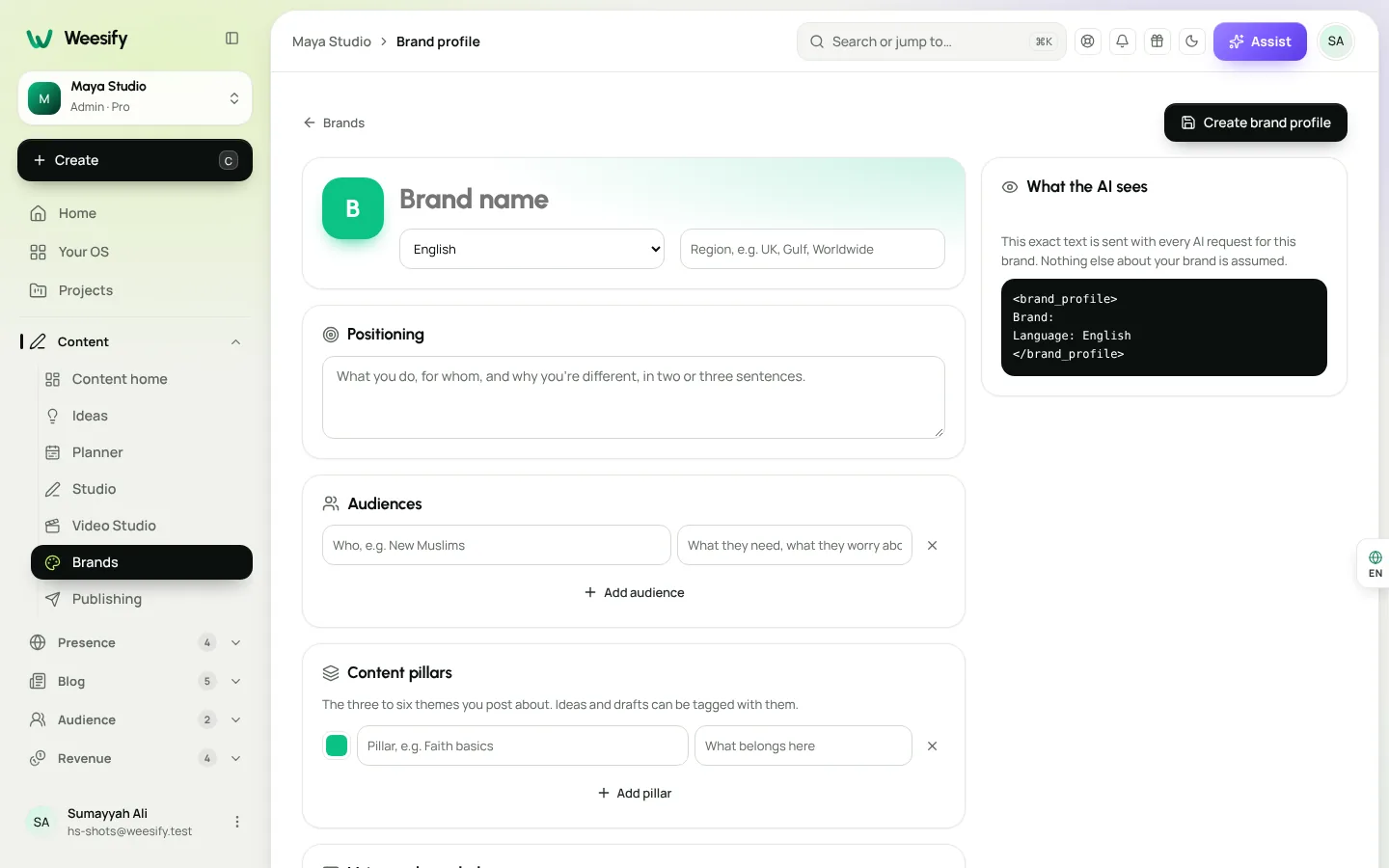
See exactly what the AI sees
At the bottom of the profile, What the AI sees shows the exact text sent with every AI request for this brand. Nothing else about your brand is assumed. This is worth reading once: if something looks vague here, your ideas will be vague too. Short and specific beats long and vague.
More than one brand?
You can keep several profiles, for example one for a school and one for a charity drive. Each idea and draft can be tied to a brand, so the voice stays consistent.
Step 2: Generate ideas in your brand voice
Open Content › Ideas and choose Ideas with AI.
- Type a topic, for example "3 mistakes new Muslims make in their first Ramadan".
- Pick a Brand.
- Choose Suggest ideas.
The suggestions use that brand's voice, audiences and pillars. Save the ones you like one by one, or choose Save all. Choose Clear ideas to start again with a different topic.
While the AI works you can watch its progress, and stop it if you change your mind. Stopping changes nothing.
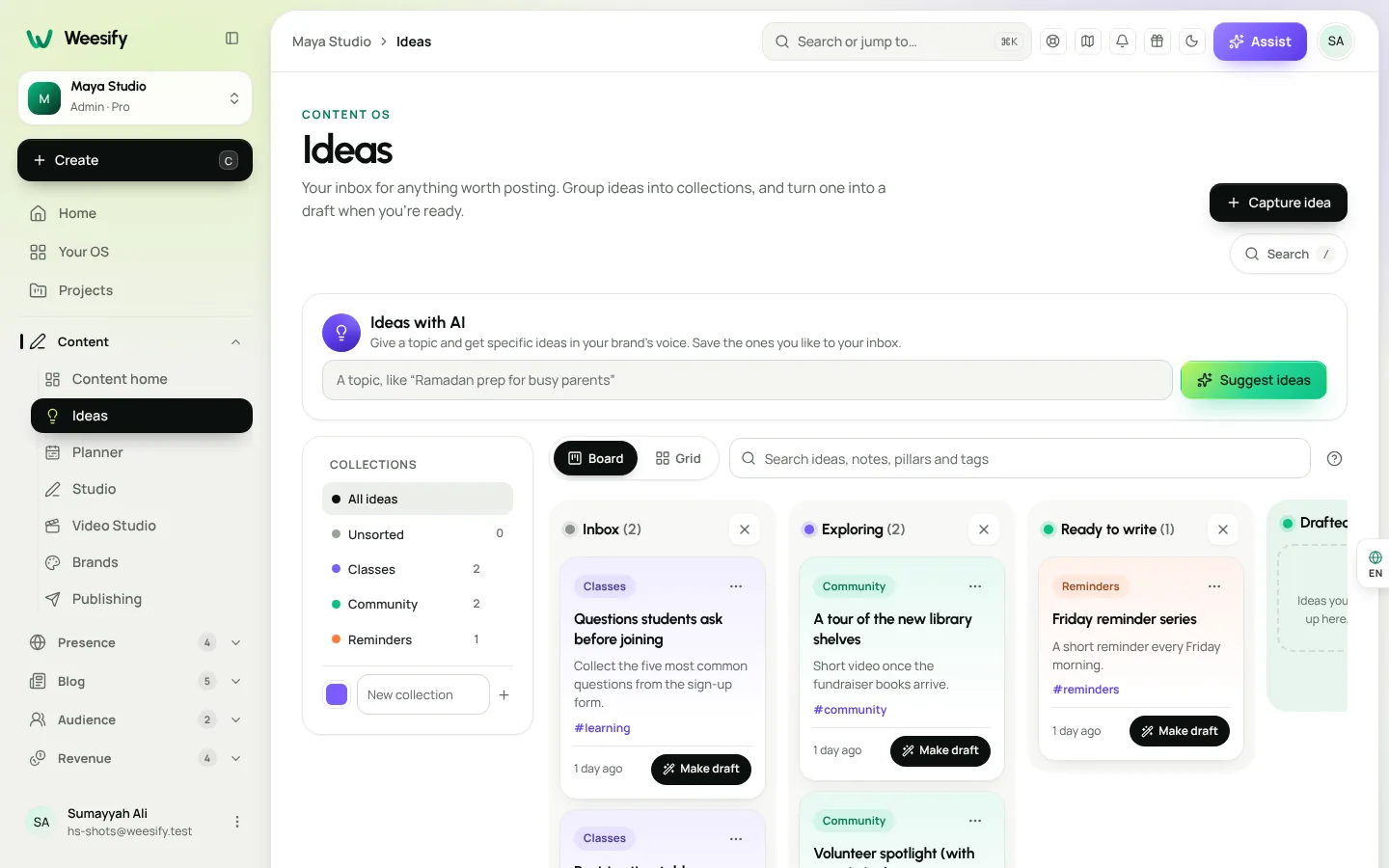
Topics that tend to produce strong ideas
- Questions people actually ask you. "Capture the question, not the answer" is the best advice we can give.
- A lesson from this week. Something you learned, taught or noticed.
- A misconception. Something your audience commonly gets wrong, and the gentle correction.
- A season or moment. Ramadan, the start of a school term, the first week of a new course.
- Your own events, courses or products. Ideas that lead somewhere useful.
Step 3: Keep your ideas organised
AI can produce more ideas than you will ever write. The inbox keeps them useful:
- Add a Pillar and Tags (separated by commas) so you can find ideas later and keep your mix balanced.
- Group related ideas into Collections with a Colour. Ideas without one appear under Unsorted.
- Switch Layout to Board and drag ideas between stages as you think them through, or to Grid for a quick scan.
- Use the Status filter to look at Inbox, Drafted or Archived ideas.
- Search covers ideas, notes, pillars and tags.
If one pillar is crowded and another is empty, that is your next topic.
Step 4: Get angles for a single post
Sometimes you know the topic but not the approach. In the Studio editor, under the AI brief, choose Ideas. Weesify suggests angles for that draft. Pick one and it goes into the brief. Then choose Write it to draft from that angle, or edit the brief first. Choose Close ideas when you are done.
Want to keep an angle for later? Save it as an idea in your inbox.
Step 5: Turn ideas into on-brand drafts
When an idea is ready, choose Make draft. It becomes a post in the Studio, with your notes and source attached. From there:
- Type a brief under Tell the AI what to write and choose Write it.
- Select text and choose Rewrite, Shorten, Expand, Tone or Translate.
- Open Per-platform versions and choose Write versions with AI to adapt wording for each network.
- If your brand profile lists words to avoid, the editor warns you when a draft uses one.
Because the brand profile travels with every request, rewrites and per-platform versions stay in the same voice as the idea that started them.
Generic AI vs. brand-aware AI
| General AI chat | Weesify Content OS | |
|---|---|---|
| Knows your audiences | Only if you paste them each time | Stored in the brand profile |
| Knows words you never use | No | Never say list, with editor warnings |
| Shows what it was told | Rarely | What the AI sees |
| Ideas saved where you write | Copy and paste | Saved to your Ideas inbox |
| Idea becomes a draft | Manual | Make draft, with notes and source |
Where does the AI run?
When AI is switched on for your workspace, Weesify can run it on its own engine, on its own servers. We explain how in Weesify AI runs on our own servers. And if AI is off, Content home says so: you can still capture ideas, write, plan and publish by hand.
A simple weekly rhythm
- Once: build one brand profile and read What the AI sees.
- Weekly: run Ideas with AI on one topic per pillar and save the best three.
- Weekly: capture every question someone asks you, as it happens.
- Weekly: turn three ideas into drafts and put them on the content calendar planner.
- Monthly: look at Insights and write more of what got clicks.
For the bigger picture of how ideas feed into a full funnel, see our content marketing funnel for creators.
Frequently asked questions
Do AI content ideas replace my own ideas?
No, and they should not. The best posts start with real questions and real moments. AI ideas help when you are stuck, and help you see more angles on a topic you already care about.
How specific should my brand profile be?
Specific enough that a new teammate could write a post in your voice after reading it. Two or three sentences of positioning, a few named audiences and three to six pillars is plenty.
Can I use different voices for different projects?
Yes. Create a brand profile for each, and choose the Brand when you generate ideas or start a draft.
Is my brand profile shared with anyone?
The profile is part of your workspace. What the AI sees shows exactly what goes with each AI request for that brand, so there are no surprises.
Can I edit AI drafts before they go out?
Always. Every draft is a starting point, and you can send it for review before it is scheduled.
Give the AI something real to work with
Better AI content ideas start with a clearer brand. Describe yours once, and every idea, angle and draft starts closer to right.
Start your 14-day trial and build your first brand profile today.
Sigue leyendo
 Growth & marketing
Captions, Highlights and Short Clips From One Long Video
One long talk can feed your short-video channels for weeks. Here is how to find the strongest moments, add captions people can read on mute, and export clips for every feed.
Growth & marketing
Captions, Highlights and Short Clips From One Long Video
One long talk can feed your short-video channels for weeks. Here is how to find the strongest moments, add captions people can read on mute, and export clips for every feed.
 Growth & marketing
Discount Codes and Offers That Sell Without Cheapening
Discounts can fill a launch or quietly train buyers to wait for a sale. Here's how to use Weesify discount codes, automatic sales, event codes and order bumps with intent.
Growth & marketing
Discount Codes and Offers That Sell Without Cheapening
Discounts can fill a launch or quietly train buyers to wait for a sale. Here's how to use Weesify discount codes, automatic sales, event codes and order bumps with intent.
 Growth & marketing
SEO Basics for Creators: Get Found Without the Jargon
Search engines are still how many people find a teacher, a shop or a consultant. These SEO basics for creators cover the few things that matter, and where to set each one in Weesify.
Growth & marketing
SEO Basics for Creators: Get Found Without the Jargon
Search engines are still how many people find a teacher, a shop or a consultant. These SEO basics for creators cover the few things that matter, and where to set each one in Weesify.
Comentarios
Aún no hay comentarios. Empieza la conversación.