


Discount Codes and Offers That Sell Without Cheapening

Discounts can fill a launch or quietly train buyers to wait for a sale. Here's how to use Weesify discount codes, automatic sales, event codes and order bumps with intent.
A discount is a promise. Used well, it says "thank you for being early" or "here's a reason to decide today." Used badly, it says "my prices aren't real, so wait for the next sale." The difference isn't the size of the discount. It's the reason behind it.
This playbook shows how to run discount codes and offers on Weesify with a clear purpose each time: launch codes, automatic sales, one-time welcome codes, event promo codes, and the offers that raise order value without a discount at all.
In this guide
- Codes vs. automatic sales: which one when
- Create a discount code in the Store
- Five offers worth running (and their settings)
- Event promo codes and access codes
- Offers that aren't discounts
- Measure what each discount really earned
- Discount mistakes to avoid
- FAQ
Codes vs. automatic sales: which one when
Weesify has two kinds of store discount:
| Code | Automatic sale | |
|---|---|---|
| How it applies | Buyers type it at checkout | Applies by itself |
| Who sees it | Only people you give it to | Everyone |
| Shown on products | No | Yes, by its Name (like "Launch week") |
| Best for | Rewarding a specific audience | Store-wide moments |
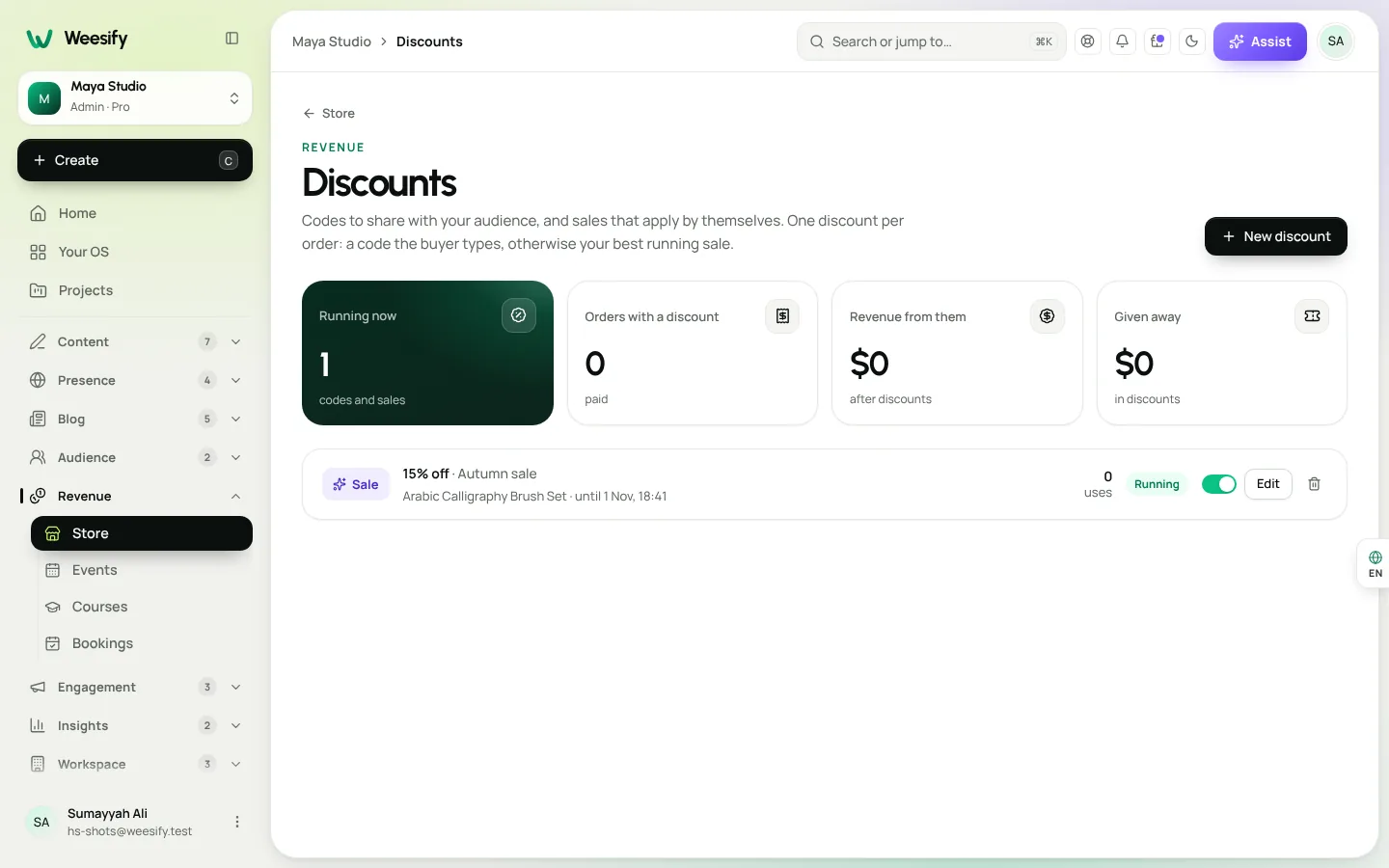
Only one discount applies per order: a code the buyer types, otherwise your best running sale. That keeps checkout simple and stops discounts from stacking into a loss.
Create a discount code in the Store
- Open Store › Discounts and choose New discount.
- Choose Code or Automatic sale.
- For a code, enter it under What buyers type, or use Suggest.
- For a sale, give it a Name that's shown on your products.
- Choose Percent off or Fixed amount, and enter the amount. A fixed amount needs a Currency.
- Under Applies to, choose Everything or Chosen products.
- Optionally set a Minimum spend, Starts and Ends, Total uses and Uses per customer. Empty means no limit.
- Make sure Switched on is ticked, then select Save.
Currency tip: a percentage with no minimum spend works in any currency. A fixed amount or a minimum spend only applies to products in that currency. If you sell in several currencies, percentages are simpler.
Five offers worth running (and their settings)
1. The launch code
Purpose: reward the people who were waiting for you.
Settings: Code LAUNCH20, Percent off 20, Ends 72 hours after launch, Total uses 100.
A real deadline and a real limit make the offer honest. When it's gone, it's gone.
2. The welcome code
Purpose: turn a new subscriber into a first-time buyer.
Settings: Code WELCOME10, Percent off 10, Uses per customer 1.
Uses per customer counts by email address, so each buyer can use it once. Put it in the first email of your welcome sequence automation. The Name field is only for you, so call it something like "Newsletter subscribers" to remember where it lives.
3. The weekend sale
Purpose: a store-wide moment, like your shop's anniversary or Eid. Settings: Automatic sale, Name "Eid weekend", Percent off 15, Starts Friday 00:00, Ends Sunday 23:59.
Times use your workspace time zone, so schedule it in advance and let it run. If you're planning a full season of content, pair it with the Ramadan campaign planner.
4. The bundle nudge
Purpose: lift the average order.
Settings: Code BUNDLE, Fixed amount off, Minimum spend set just above your most popular product's price.
Buyers add a second item to unlock it. Works best on a storefront with a cart. See how to pick the right store template.
5. The partner code
Purpose: thank a community, school or organisation that sends you buyers. Settings: Code named after the partner, Chosen products, a modest Percent off, Total uses agreed with them.
If partners promote you regularly, consider Weesify's affiliate programme instead, so they earn a commission rather than giving your margin away.
Event promo codes and access codes
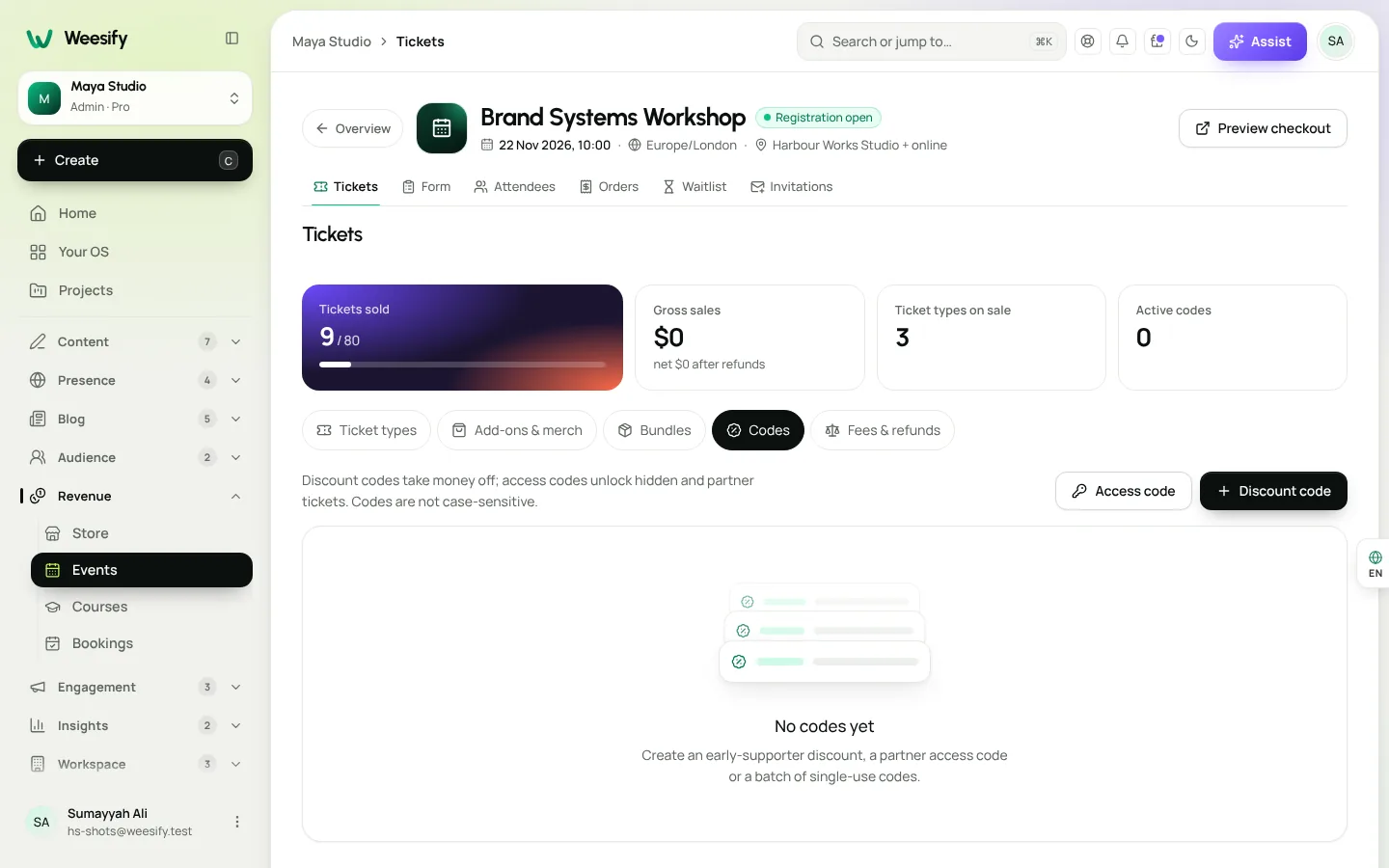
Event tickets have their own codes, on the event's Tickets › Codes tab, separate from store discounts:
- Discount codes take money off: Percent off or Amount off.
- Access codes unlock hidden and partner tickets: perfect for sponsors, speakers' guests or member-only tickets.
Set Total uses, Uses per email, and Valid on dates for repeating events. Set How many codes above one to create a batch of single-use codes with a Prefix, then Copy all. Codes aren't case-sensitive, and Valid for all my events makes one code work across every event. Full set-up is in how to host and sell event tickets.
Offers that aren't discounts
Sometimes the best offer keeps your price whole. Store › Earn more has tools that are all off until you switch them on:
- Order bump: a tick-box offer in the checkout summary, added to the same payment. "Add the bonus worksheet pack" at a small price.
- One-click upsell: a special offer right after payment. Card buyers accept with one button.
- Abandoned checkout recovery: two reminder emails (after 1 hour and 24 hours) to people who started checkout but didn't pay. It stops as soon as they buy. You can include a Discount code in the reminder, created in Store › Discounts first.
- Instalment plans: let buyers split a bigger price.
- Tips: let happy buyers add a little extra.
A discount in the recovery email is a strong closer, but use a small one. The buyer was already interested; you're removing friction, not convincing them from scratch.
Measure what each discount really earned
The Discounts page shows Orders with a discount, the amount Given away and the Revenue from them. Each discount shows whether it's Running, Scheduled, Ended or Used up.
After every offer, ask three questions:
- Did it bring new buyers, or just discount people who'd have bought anyway?
- Was the revenue worth what was given away?
- Did sales dip afterwards (a sign buyers are learning to wait)?
For deeper answers, check where buyers came from in your analytics.
Discount mistakes to avoid
- Always-on sales. If there's always a sale, the sale price is your real price.
- Fake urgency. Weesify storefront templates only show badges and countdowns when they're true, such as a sale that really ends soon. Keep your own copy just as honest.
- Codes with no limits. A code shared on a coupon site with no Total uses can run for months.
- Discounts with no end date. Even a welcome code benefits from a review every few months. Check Given away against Revenue from them.
- Forgetting donations. Discount codes and sales tax don't apply to donations, so don't promise them there.
FAQ
Can buyers use more than one discount code?
No. One discount applies per order: a code the buyer types, otherwise your best running sale.
Why doesn't my fixed-amount code work on some products?
A fixed amount or a minimum spend only applies to products in that discount's currency. Use a percentage with no minimum spend if you sell in several currencies.
Can I limit a code to one use per person?
Yes. Set Uses per customer to 1. It counts by email address.
Are event promo codes the same as store discount codes?
No. Event codes live on the event's Tickets › Codes tab, and include access codes that unlock hidden tickets. Store discounts live in Store › Discounts.
Does deleting a discount change past orders?
No. Past orders keep their prices.
Discount with a reason
Every offer should answer "why now?" with something true: a launch, a holiday, a thank-you. Do that, and discount codes and offers build trust instead of eroding it. If you're still building your first product, start with selling digital products online.
Start your 14-day trial and run your first launch offer.
Sigue leyendo
 Growth & marketing
AI Content Ideas That Sound Like Your Brand, Not a Robot
Generic AI ideas produce generic posts. Describe your brand voice once in Weesify and every idea, angle and draft starts closer to how you actually speak.
Growth & marketing
AI Content Ideas That Sound Like Your Brand, Not a Robot
Generic AI ideas produce generic posts. Describe your brand voice once in Weesify and every idea, angle and draft starts closer to how you actually speak.
 Growth & marketing
Captions, Highlights and Short Clips From One Long Video
One long talk can feed your short-video channels for weeks. Here is how to find the strongest moments, add captions people can read on mute, and export clips for every feed.
Growth & marketing
Captions, Highlights and Short Clips From One Long Video
One long talk can feed your short-video channels for weeks. Here is how to find the strongest moments, add captions people can read on mute, and export clips for every feed.
 Growth & marketing
SEO Basics for Creators: Get Found Without the Jargon
Search engines are still how many people find a teacher, a shop or a consultant. These SEO basics for creators cover the few things that matter, and where to set each one in Weesify.
Growth & marketing
SEO Basics for Creators: Get Found Without the Jargon
Search engines are still how many people find a teacher, a shop or a consultant. These SEO basics for creators cover the few things that matter, and where to set each one in Weesify.
Comentarios
Aún no hay comentarios. Empieza la conversación.