


Weekly Series: Sell Paid Sessions in One Checkout

New in Weesify Bookings: sell a set of sessions, same day and time each week, in one checkout. Every week is checked before payment, and fair refunds are built in.
Some work doesn't fit in one call. A six-week tajweed course with one student. A monthly retainer of four strategy calls. An eight-week fitness programme at the same time each Monday. Selling these one session at a time is tiring for everyone: the client books and pays eight times, and you hope Monday 10:00 is still free in week six.
Weekly series fixes that. You can now sell a set of paid sessions on one booking page, same day and same time each week, in a single checkout. Weesify checks every week before the client pays, holds all the times together, and gives each session its own meeting room. If plans change, refunds for unused sessions are built in.
In this guide
- What a weekly series is
- Set up a weekly series, step by step
- What your client sees at checkout
- Each session's meeting room
- Cancelling and refunds, done fairly
- Weekly series vs. other ways to sell sessions
- FAQ
What a weekly series is
A weekly series is a booking page setting. Instead of selling one session, the page sells a fixed number of sessions, from 2 to 52, at the same day and time each week. The client picks the first time; Weesify books the rest.
A few things happen automatically:
- Every week is checked before payment. If any week is already taken, nothing is booked, and the client is asked to pick another time. No half-booked series.
- All sessions are held and confirmed together. One payment, one confirmation.
- The local time stays the same. A series at 10:00 stays at 10:00 when the clocks change for daylight saving.
Set up a weekly series, step by step
You'll need a booking page for Appointments first. If you haven't made one, our booking page guide for consultants walks through it. Paid series also need payments set up, which the store guide explains.
- Open Bookings and choose your booking page.
- Set the Price for one session under Price, for example 30 in your currency.
- Open the page's Scheduling rules.
- Find the Weekly series card: "Sell a set of sessions, same day and time each week, in one checkout."
- Enter the number of Sessions in the series, for example 6. (Use 0 for single sessions.)
- Optionally enter a Series price. If you leave it empty, the series costs the session price times the number of sessions. Set your own to offer a package saving, for example 150 instead of 180.
- Select Save rules.
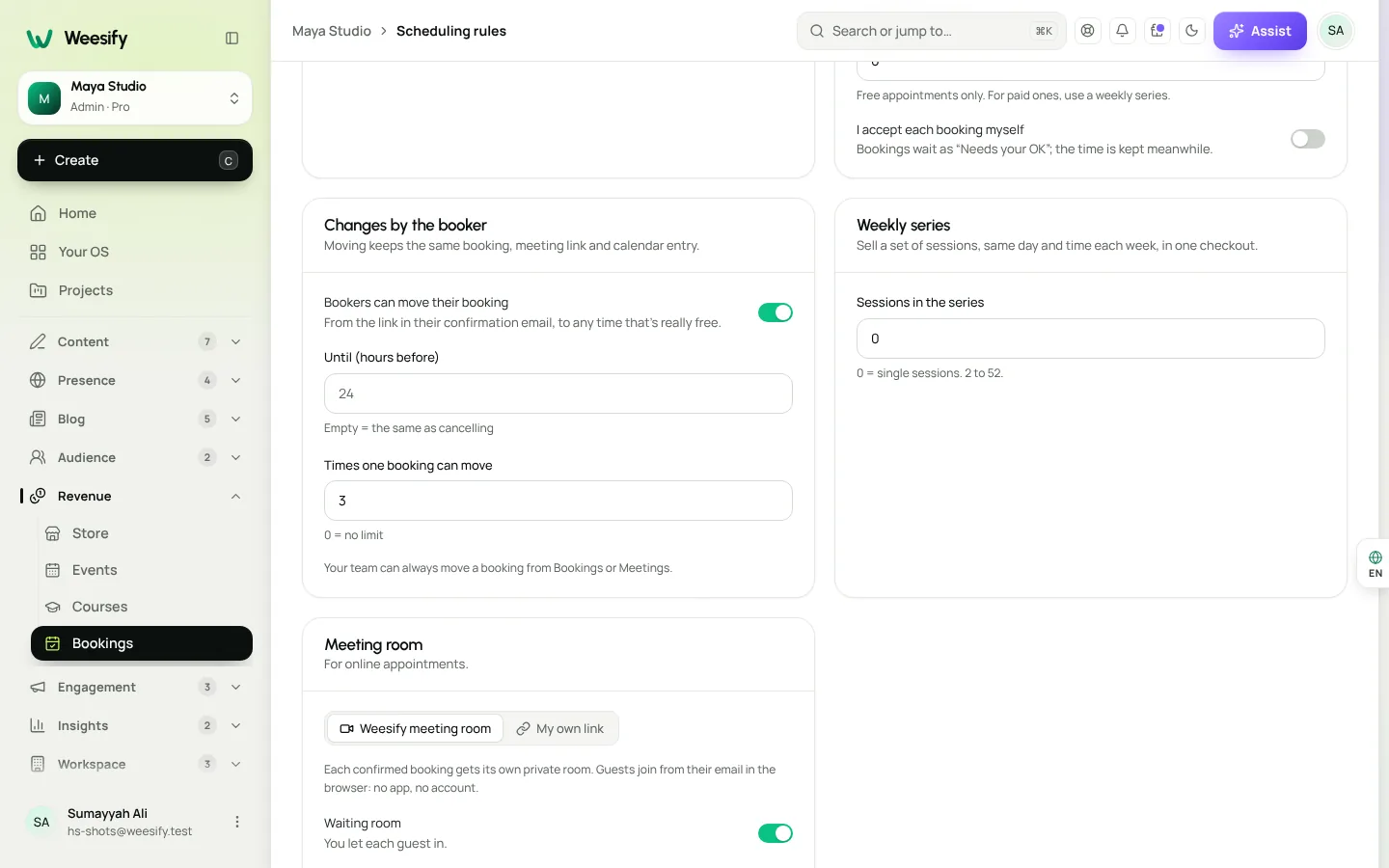
Under the fields, Weesify spells out the rules your clients will follow, so you never have to explain them yourself.
One thing to choose between
Booking pages also have Repeat weekly, up to, where bookers choose how many weeks they want. That option is for free appointments only. For paid ones, use a weekly series. You can't use both on the same page: Weesify asks you to "Choose one: a fixed series, or letting bookers pick how many weeks."
What your client sees at checkout
Say Maryam is booking a six-week Qur'an recitation course with her teacher.
- She opens the booking page and picks the first time: Tuesday at 18:00.
- Weesify checks all six Tuesdays at 18:00. All free.
- At checkout, she sees one line, such as "6 weekly sessions · 150", and pays once.
- She gets one confirmation for the whole series, with calendar invites and reminders before each session.
If week four had already been taken, she'd be asked to choose a different time before paying, rather than discovering a gap later.
Each session's meeting room
If the booking page uses the Weesify meeting room, every session in the series gets its own private room. Inside, the client sees where they are in the run, for example "Part of a weekly series (3 of 6)". Your Upcoming list labels them the same way: "Session 3 of 6".
This makes recordings and notes easy to follow week by week. If you record sessions, each one gets its own transcript and AI summary. See meeting recordings, transcripts and summaries and self-hosted video meetings on Weesify.
Cancelling and refunds, done fairly
Life happens mid-series. Weekly series handle it without awkward emails.
When the client cancels
Clients can cancel one session, or all remaining ones, before your cancellation cut-off. For a paid series, that becomes a refund request for the unused share, which you approve or decline from the order.
When you cancel
Open the session from Upcoming. You'll see:
- Cancel this session: just this one.
- Cancel this and later: this session and every later one still to come.
- Refund the unused share: for a paid series, refund the sessions given up, shown as an amount per session.
Your team can cancel the remaining sessions and refund the unused share in one step. The client is emailed either way.
Moving one session
Reschedule moves a single booking to a free time and emails the client. The meeting link stays the same, and they get an updated calendar file. If you allow it in Scheduling rules, clients can move a booking themselves too, within your limits.
Weekly series vs. other ways to sell sessions
| You want to sell… | Best fit on Weesify |
|---|---|
| One paid call | A normal booking page |
| A fixed run of paid sessions, same time each week | Weekly series |
| Free repeat sessions where the client picks how many weeks | Repeat weekly, up to |
| A group class on set dates with limited places | A booking page of kind Event, or a full Weesify event with tickets |
| Self-paced lessons with videos and quizzes | An online course |
Ideas for a weekly series
- Tutoring: 8 weekly Arabic or maths sessions for one student.
- Coaching: a 6-week accountability programme.
- Consulting: 4 weekly strategy calls during a launch.
- Health and wellbeing: 10 weekly one-to-one sessions.
- Skills: a 12-week portfolio mentorship.
Coaches and tutors will find more set-ups in Weesify for coaches and consultants and Weesify for Islamic educators. Planning a launch around your new programme? Our guide to discount codes and offers covers timing and limits.
FAQ
How many sessions can a weekly series have?
From 2 to 52 sessions. Enter 0 in Sessions in the series to go back to single sessions.
Can I charge less for the whole series than for single sessions?
Yes. Enter your own Series price. If you leave it empty, the series costs the session price times the number of sessions.
What if one of the weeks is already booked?
Every week is checked before payment. If one is taken, nothing is booked, and the client picks another time. They never pay for a series with a gap in it.
Can clients cancel part of a paid series?
Yes, before your cut-off. They can cancel one session or all remaining ones, and a paid series becomes a refund request for the unused share, which you review.
Does a weekly series keep the same time when daylight saving changes?
Yes. A weekly series keeps the same local time, so a 10:00 session stays at 10:00 across the change.
Sell the programme, not the hour
Clients commit more to a programme than to a single call, and you plan better when you know the next six weeks. Set up your first weekly series in a few minutes.
Start your 14-day trial and sell your first weekly series.
Continuer la lecture
 Product news
The Weesify API and CLI: A Developer's Guide
Scoped tokens, a documented REST API, signed webhooks and a one-file CLI that deploys websites from your laptop or build pipeline. Here is how they fit together.
Product news
The Weesify API and CLI: A Developer's Guide
Scoped tokens, a documented REST API, signed webhooks and a one-file CLI that deploys websites from your laptop or build pipeline. Here is how they fit together.
 Product news
Meeting Recordings, Transcripts and AI Summaries
Record a client session in Weesify Meetings and get a speaker-labelled transcript and an AI summary with highlights, action items and decisions, all made on Weesify's own servers.
Product news
Meeting Recordings, Transcripts and AI Summaries
Record a client session in Weesify Meetings and get a speaker-labelled transcript and an AI summary with highlights, action items and decisions, all made on Weesify's own servers.
 Product news
Weesify 2.0: What's New in the Rebuilt Weesify
From a link page in 2022 to an operating system for your online presence, audience and income. Here is everything new in Weesify 2.0, in plain words.
Product news
Weesify 2.0: What's New in the Rebuilt Weesify
From a link page in 2022 to an operating system for your online presence, audience and income. Here is everything new in Weesify 2.0, in plain words.
Commentaires
Aucun commentaire pour l’instant. Lancez la conversation.