


Weesify for Islamic Educators: Courses, Classes and Community

A practical look at how an Islamic educator can run courses, live classes, one-to-one sessions and a student community from one Weesify workspace.
Teaching is the part you love. Everything around it, the sign-up sheets, the payment links, the group chats, the "which link was the class on again?" messages, is the part that wears you down. Weesify for Islamic educators brings that surrounding work into one place, so a teacher of Qur'an, Arabic, fiqh or seerah can spend more time teaching and less time stitching tools together.
This guide walks through a realistic workflow. The teacher in it, "Ustadha Maryam", is an example we made up to show how the pieces fit. She is not a customer, and nothing here is a testimonial. Every feature mentioned is one you can open in Weesify today.
In this guide
- What an Islamic educator usually juggles
- Courses with drip lessons, quizzes and certificates
- Live classes and one-to-one sessions with bookings
- A community space for your students
- Keeping in touch with email, forms and events
- A setup checklist and FAQ
The usual juggling act
Picture Ustadha Maryam. She teaches an eight-week Arabic reading course for adults, runs a weekly tajweed circle for sisters, offers one-to-one recitation sessions and gives a seasonal talk before Ramadan. Before, that meant a form tool for sign-ups, a separate payment link, a video platform for lessons, a calendar link for one-to-ones and a busy messaging group for announcements.
With Weesify she runs all of it from one workspace. Each student who signs up, books or buys becomes a contact she can see in one list, with a timeline of what they joined.
Courses that respect your students' pace
Open Revenue › Courses and create a course. Lessons can hold video and written notes, and you can add quizzes and a certificate at the end. Courses can be free or paid.
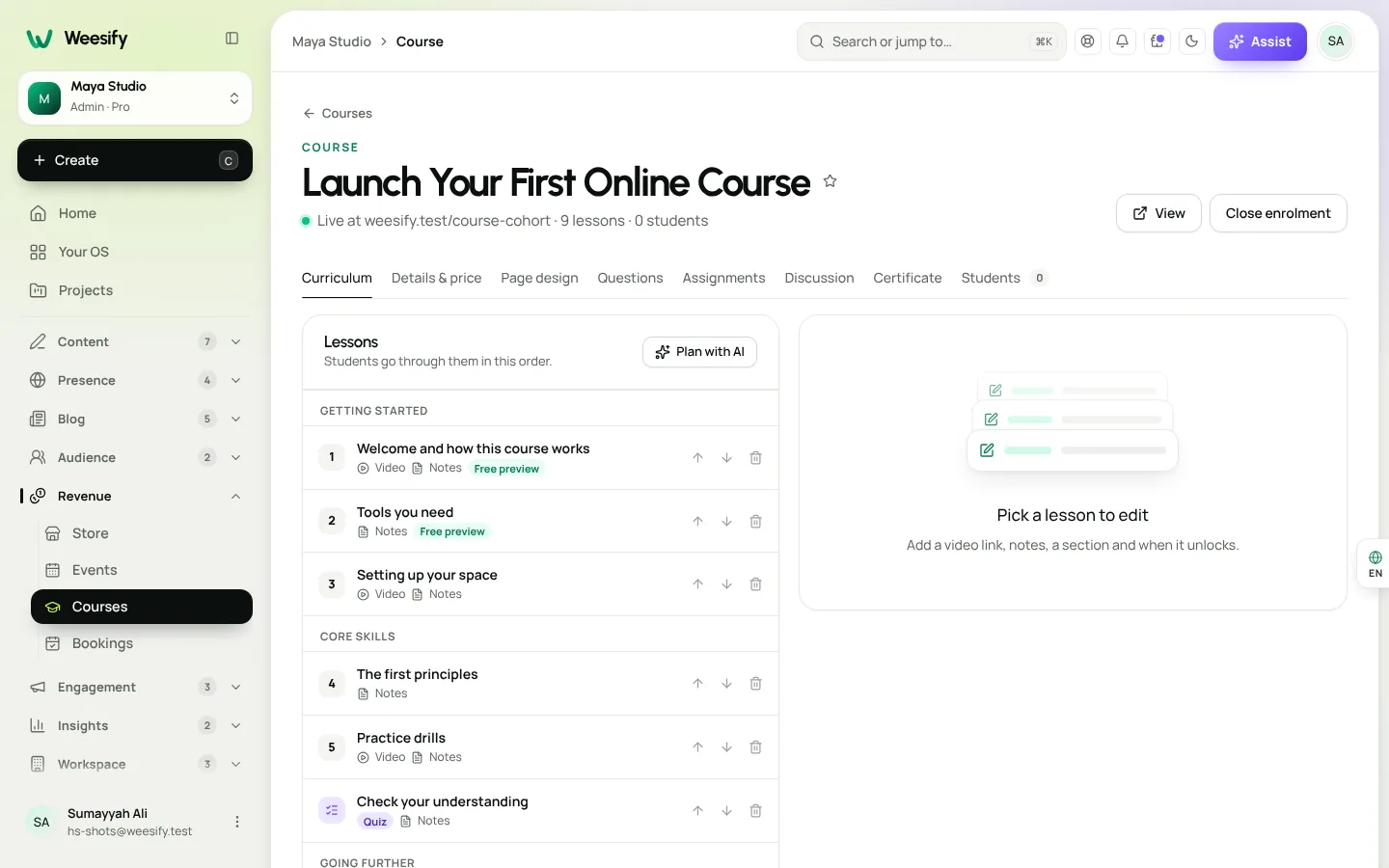
A few settings matter a lot for structured Islamic learning:
- Drip lessons. On the Curriculum tab, set Unlocks after for each lesson, counted in days from each student's own enrolment. For a weekly course, use 0, 7, 14 and so on. Students who join later get the same rhythm.
- Quizzes that control pace. Students must pass a quiz to move on, which suits subjects that build on each other, like reading rules before longer passages.
- Free preview. Turn on Free preview for one lesson so people can hear your teaching style before they enrol.
- Close enrolment. Choose Close enrolment when a cohort is full. Current students keep access.
There are six course page designs to choose from: Academy, Minimal, Cohort, Cinematic, Workbook and Community. Students get a learning area with progress rings, resume, speed control, private notes, downloads, questions, quizzes and a certificate. It works in light and dark, on phones, and right to left, which matters when your lessons and notes include Arabic.
Read the full walkthrough in Launch an online course on Weesify.
Live classes and one-to-one sessions
Recitation correction and personal mentoring need real time together. Weesify Bookings handles that.
- Open Revenue › Bookings and create a bookable service, such as "One-to-one recitation, 30 minutes".
- Under When people can book, switch on your teaching days and hours.
- Set a Break after each booking, so you have a few minutes to write notes for the student.
- Use People per time above 1 for a small group circle.
- Add a price if the session is paid. Guests get calendar invites and reminders.
Under Schedules & holidays you can keep more than one named weekly schedule, for example your usual hours and a lighter set of evening hours for Ramadan, and point a booking page at the one you need with Follow a schedule. Days off covers Eid, travel or exam weeks.
Guests choose their time zone on the booking page and can switch between 12 and 24 hour times, which helps when your students live across several countries. There are ten booking page designs to choose from.
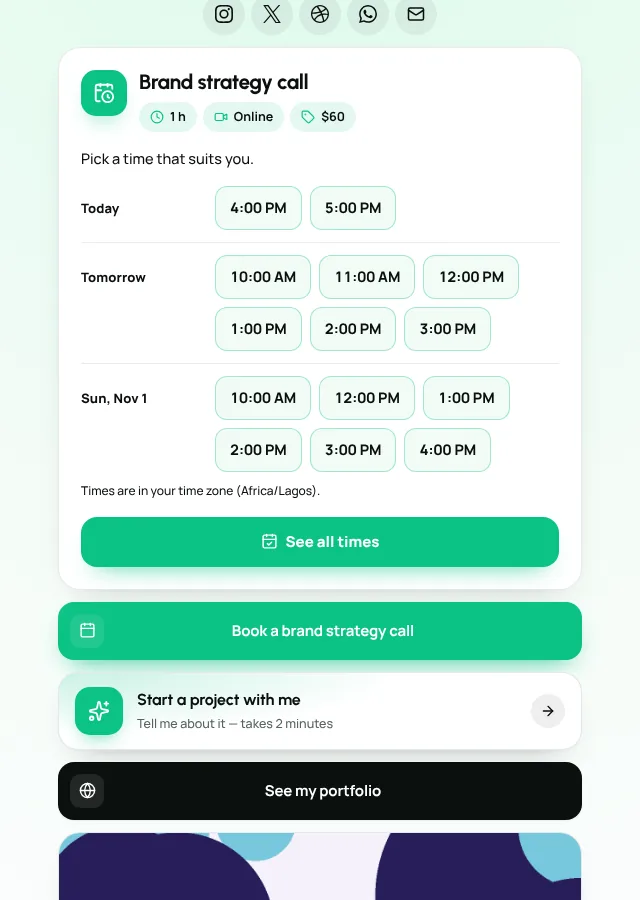
For weekly paid circles, see Run a weekly series of paid sessions. For the booking page itself, see A booking page for consultants.
A community space for your students
Messaging groups get noisy and lose good questions. A Weesify community gives your students spaces, posts, comments and a member list, free or paid to join. You can choose from five community experiences, from a simple feed to a forum-style layout.
A pattern that works well for teachers:
- One space per course cohort, so questions stay with the right group.
- A general announcements space for class times and reminders.
- Moderation your way, from the same workspace.
Learn more in Build a paid community and Community experiences: feeds and forums.
Staying in touch: forms, email and events
Forms. A short sign-up form for "Notify me when the next Arabic course opens" feeds straight into your contacts. Step-by-step forms with logic let you ask about a student's current level and send them to the right class. See Forms that capture leads.
Email and automations. Send a broadcast when enrolment opens, or set an automation that welcomes every new student with a short message and the first lesson link. See Automations: a welcome sequence.
Events. For a public talk or a weekend intensive, create an event with free or paid tickets, and check people in at the door by scanning their QR codes. Public events can appear in the events directory. Read Host and sell event tickets.
Your page: one link for everything
All of this sits behind one page. Use blocks to show your courses, booking button, upcoming events and a sign-up form. Connect your own domain if you have one. If you already share lessons on social media, Assist can build a first draft of the page from your existing links. Start with A link-in-bio page that sells.
Weesify for Islamic educators: what goes where
| You need to... | Use this in Weesify |
|---|---|
| Teach a structured, self-paced course | Courses with drip lessons, quizzes and certificates |
| Hold one-to-one or small group sessions | Bookings with schedules, buffers and reminders |
| Keep student discussion organised | Community spaces |
| Announce a new course | Forms, contacts and email broadcasts |
| Run a seasonal talk or intensive | Events with tickets and QR check-in |
| Share one link everywhere | Your Weesify page and a custom domain |
Setup checklist for your first week
- Create your workspace and pick a page template.
- Add a course with at least the first three lessons and one quiz.
- Set drip timing on the Curriculum tab.
- Create one bookable service and set your hours.
- Add a "Notify me" form and link it from your page.
- Start one community space for your first cohort.
- Write a welcome automation for new students.
Language and audience
Weesify's interface is available in English, Arabic, French, Malay and Spanish, so you and your team can work in the language you are most comfortable with. Your course content is yours to write in any language.
Planning content around the Islamic year
Many teachers plan around Ramadan, Dhul Hijjah and the start of the academic year. Content OS lets you capture ideas, plan posts on a calendar and schedule them. If your students follow you on social media, read Grow your audience with a Ramadan campaign planner.
Frequently asked questions
Can I run free and paid courses side by side?
Yes. Each course can be free or paid, so you can offer a free introduction and a paid full course from the same workspace.
Do my students need to create a password?
Students reach their course through a private course link, and a lost link can be sent again from Student actions › Resend link.
Does the learning area support Arabic text?
The student learning area works right to left, and the Weesify interface is available in Arabic. Your lesson notes can be written in Arabic or any other language.
Can I offer a discount for students who cannot afford the full fee?
Yes. You can create discount codes, and Store products also support pay-what-you-want pricing. See Discount codes and offers.
Is there an education discount on Weesify itself?
Schools, universities, teachers and students can apply for an education discount on Pro and Business from Settings › Plan & billing › Discounts. Approval depends on the evidence you send.
Start teaching from one place
You do not need five tools to teach well online. Set up a course, a booking page and a community space in one workspace, and let your students find everything behind one link.
Start your 14-day trial and build your first course this week. Every plan starts with a 14-day trial; you add a card to start and nothing is charged during the trial.
Continuer la lecture
 Use cases
Booking Page for Consultants: Fill Your Calendar Calmly
Stop the back-and-forth emails. A Weesify booking page lets clients pick a free time, pay up front and get a calendar invite and a private meeting room.
Use cases
Booking Page for Consultants: Fill Your Calendar Calmly
Stop the back-and-forth emails. A Weesify booking page lets clients pick a free time, pay up front and get a calendar invite and a private meeting room.
 Use cases
Build a Paid Community on Your Own Page, Step by Step
A paid community gives your most engaged people a home and gives you income that does not depend on a feed. Here is how to plan, price and launch one with Weesify Community.
Use cases
Build a Paid Community on Your Own Page, Step by Step
A paid community gives your most engaged people a home and gives you income that does not depend on a feed. Here is how to plan, price and launch one with Weesify Community.
 Use cases
Weesify for Agencies: Host and Manage Client Websites
How an agency can host client websites, collect approvals, publish safely and hand projects over, with a separate Weesify workspace for each client.
Use cases
Weesify for Agencies: Host and Manage Client Websites
How an agency can host client websites, collect approvals, publish safely and hand projects over, with a separate Weesify workspace for each client.
Commentaires
Aucun commentaire pour l’instant. Lancez la conversation.