


Branded Short Links: The Complete Guide for Creators

Branded short links are easier to say, easier to trust and easier to measure. Here is how to create, schedule, target and track them in Weesify.
Long links are hard to read, hard to say out loud and impossible to remember. They also tell you nothing about who clicked them. Branded short links fix all of that. A link such as go.noorstudio.com/ramadan looks like you, fits on a poster, survives being read out in a live stream, and counts every click.
Weesify's Links tool gives you short links with your own endings, your own domain, scheduling, passwords, country and device targeting, and analytics that work without cookies. This guide walks through each part with the exact labels you will see in the app.
In this guide
- What makes a short link "branded"
- Create your first short link
- Use your own domain
- Track campaigns with UTM parameters
- Schedule, limit and protect a link
- Send people to the right place by country or device
- Read your link analytics
- Tidy habits for teams
What makes a short link "branded"?
A short link has two parts: the domain and the ending (sometimes called the back-half or slug). A branded short link uses words you choose for both.
| Type | Example | Trust | Easy to say? |
|---|---|---|---|
| Raw long link | example.com/shop/products?id=8841&ref=ig | Low | No |
| Random short link | weesify.com/x7Kp2qa | Medium | No |
| Custom ending | weesify.com/eid-gifts | Good | Yes |
| Your domain + custom ending | go.noorstudio.com/eid-gifts | Best | Yes |
People are more likely to tap a link when they can see whose it is and roughly where it goes. That is the whole idea.
Create your first short link
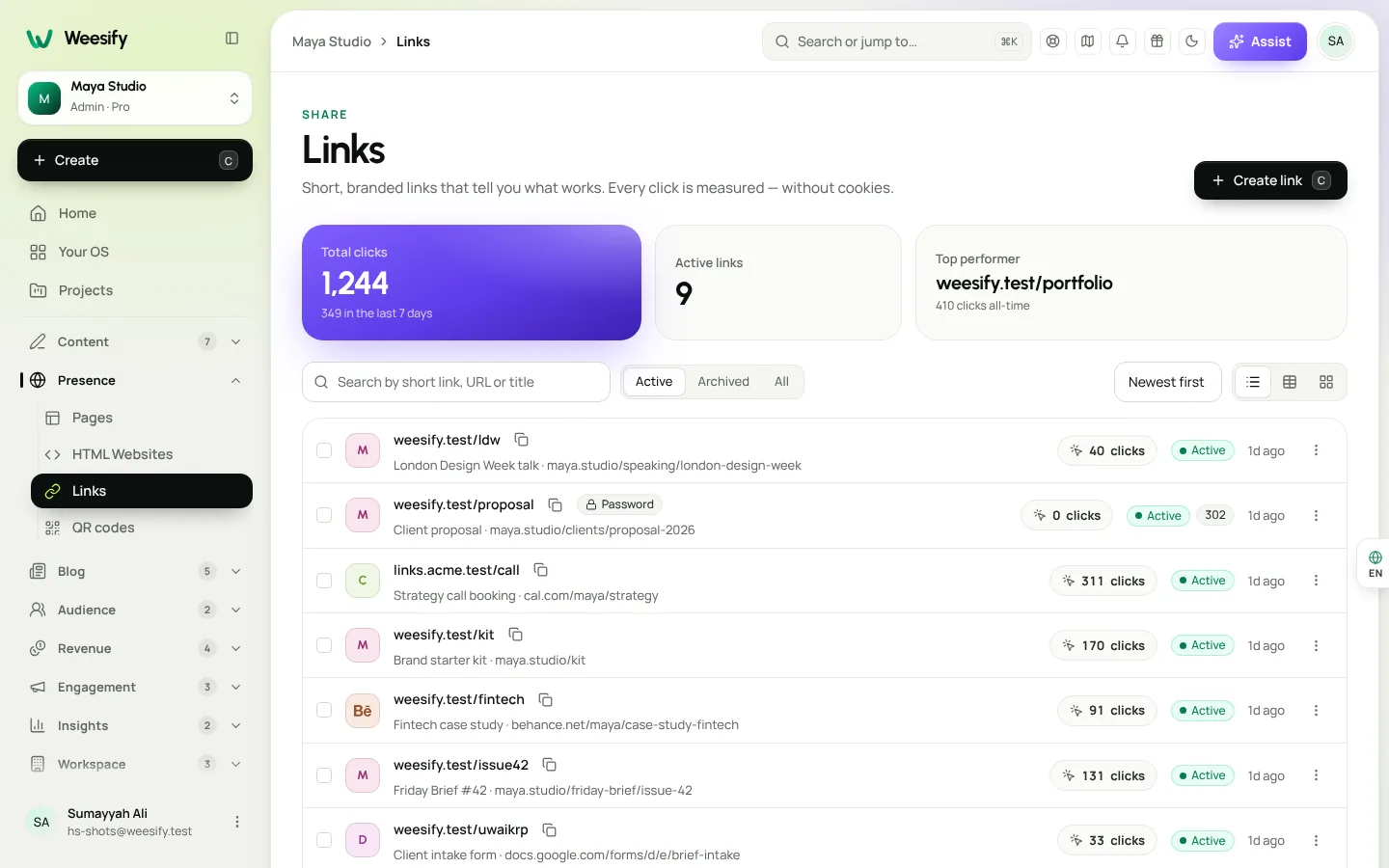
- Open Presence › Links in the sidebar and choose Create link.
- Paste the Destination URL, the long address you want to send people to.
- Under Short link, type an ending, or leave it blank for a random one. Choose Randomize if you want Weesify to suggest one. Use letters, numbers, dots, dashes or underscores; the editor tells you straight away whether the ending is Available or Taken.
- Give it a Title so you can find it later, and optionally add Tags (up to 10) and Notes. Notes are only seen by your team.
- Save. Copy the link, or choose Make QR code to print it.
Change the destination later
Open the link and edit the destination. Everyone who uses the link from now on goes to the new place, including anyone scanning a QR code you already printed. This is why we recommend pointing printed material at a short link rather than straight at a page. More on that in Dynamic QR codes explained.
Redirect type
In the link editor you can also choose the Redirect type. The default is 301 · Permanent. The editor's own advice is worth repeating: 301 is permanent and cached by browsers, so use 302 · Temporary if you will change the destination often.
Use your own domain
Short links on weesify.com work well. Short links on your own domain work better, because every click reinforces your brand.
- Open Workspace › Domains and choose Connect domain.
- Use a subdomain such as
go.yourbrand.comorlinks.yourbrand.com, or a dedicated short domain. - Set what This domain serves to include Short links.
- Add the TXT and CNAME records Weesify shows, then choose Verify now.
New links can then use your domain instead of the Weesify address. The full walkthrough, including fixes for common DNS mistakes, is in our custom domain setup guide.
Track campaigns with UTM parameters
If you measure campaigns in another analytics tool as well, open the UTM section of the link. Fill in the source, medium and campaign once, and they are added to the destination on redirect. Your short link stays short; the destination gets the tracking.
A simple naming habit helps:
- Source: where the link appears (
instagram,newsletter,poster) - Medium: the type of placement (
social,email,print) - Campaign: what you are promoting (
ramadan-planner,autumn-cohort)
You can also turn on Forward query parameters. That passes anything like ?ref=partner from the short link through to the destination, which is useful when partners add their own reference.
Schedule, limit and protect a link
Open Schedule & limits to control when and how often a link works.
- Starts and Expires: the link only works between these times. Before the start it shows as Scheduled; after expiry it shows as Expired.
- After expiry, send visitors to: instead of a dead end, send late visitors somewhere useful, such as your next event.
- Click limit: stop the link after a set number of clicks, handy for a limited early-bird offer.
For private material, turn on Password protection and choose a password. Visitors must enter it before being redirected. To change it later, type a new one; to remove it, choose Remove the current password.
There is also a Sensitive content warning, which asks visitors to confirm before continuing.
Send people to the right place by country or device
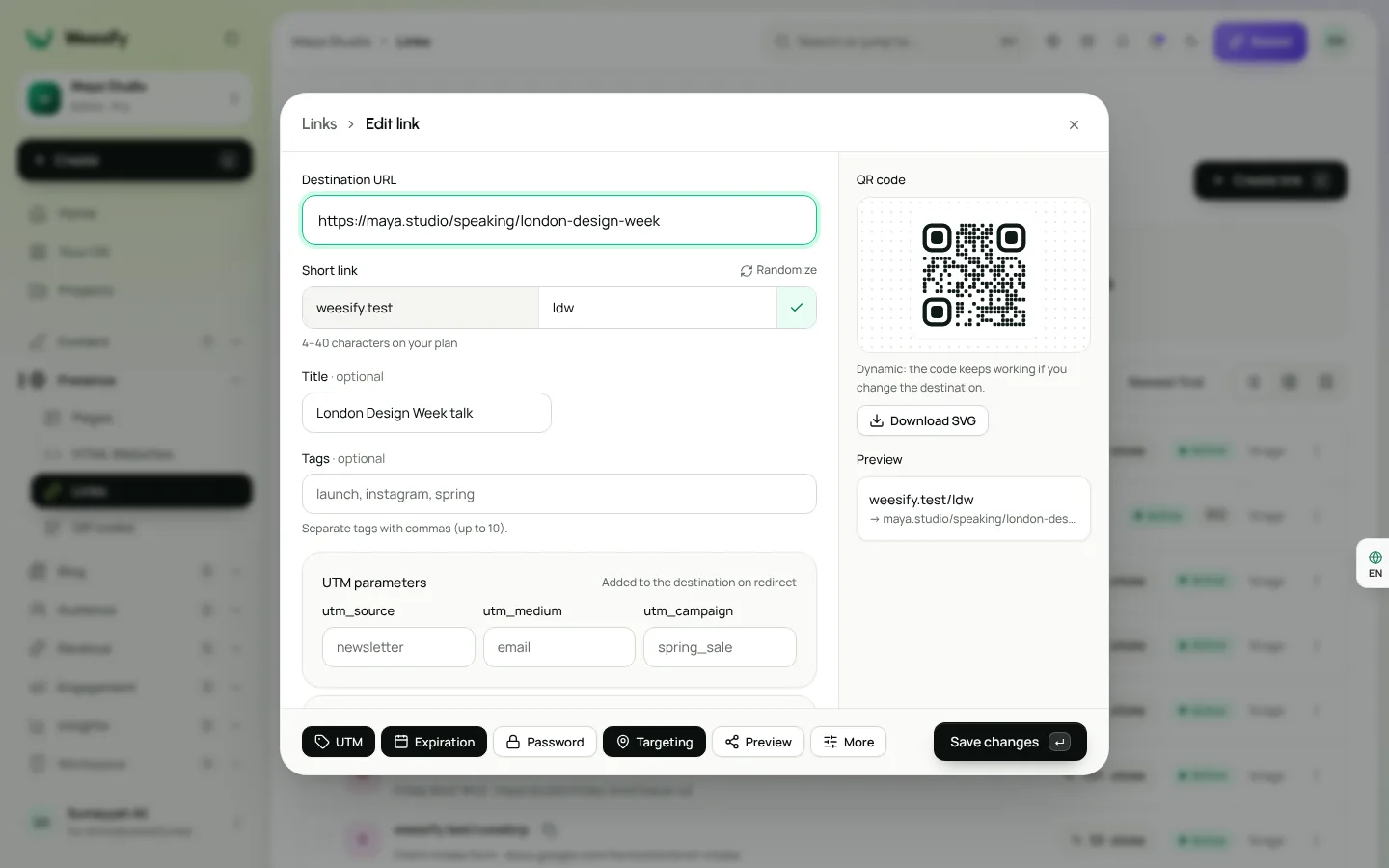
One link, different destinations. Open Targeting in the link editor:
- Country: choose Add a country and give an Address for this country. A store with regional sites can send visitors from Malaysia to one page and visitors from Nigeria to another.
- Device: set separate addresses for iPhone & iPad, Android and Desktop, for example to send phone users to the right app store.
The rule is country first, then device. Anyone who matches no rule goes to the normal destination. Weesify checks every alternative address when you save.
Open links in the app
When your destination is a page on a well-known app, the editor recognises it and offers Open in the app. On phones, visitors open it in that app when they have it, or on the web when they do not. That saves people from being stuck signed out in a browser.
Control the link preview card
When your link is shared in chats and feeds, apps show a preview card. Under Link preview you can set the Title, Description and image of that card, so it says what you want rather than whatever the destination page happens to show.
Read your link analytics
Choose View analytics on any link. You will see Total clicks, Unique visitors and Clicks over time, plus referrers, countries, devices and browsers for that link. Cities, hours and more opens the deeper report.
Visitors are counted with a daily-rotating anonymous hash: no cookies, no stored IP addresses. There is nothing to add to a cookie banner.
A few ways to use the numbers:
- One link per channel. Make one link for your newsletter and another for your posters, both pointing to the same place. Now you can compare channels directly.
- Check the hour. If most clicks arrive in the evening, post in the evening.
- Sort by Most clicked on the list to find your Top performer, then give it pride of place on your bio page.
For a wider picture across pages, links and QR codes, read Analytics: know where your visitors come from and Location analytics: countries and cities.
Tidy habits for teams
- Use Tags like
launchorinstagramso anyone can filter. - Use Bulk actions to archive old campaign links together. Archived links can be restored.
- Duplicate a link to reuse its UTM and settings for the next campaign.
- Be careful with Delete: the short link stops working and its ending can be claimed again.
Frequently asked questions
What is a branded short link?
It is a short web address that uses your own words, and ideally your own domain, such as go.yourbrand.com/offer. It redirects to a longer destination and counts each click.
Can I change where a short link goes after I share it?
Yes. Edit the destination and every future click goes to the new place, including scans of printed QR codes that point at the link.
Do Weesify short links use cookies?
No. Clicks are counted with a daily-rotating anonymous hash. No cookies are set and no IP addresses are stored.
What happens when a short link expires?
It stops sending people to the destination. If you set After expiry, send visitors to, they go to that address instead.
Can one short link send different people to different pages?
Yes. Use Targeting to set addresses by country and by device (iPhone and iPad, Android, desktop). Country rules are checked first.
Make every link count
Short links are small, but they carry your name into every post, poster and message. Make them yours, point them at the right place, and let the numbers tell you what works.
Start your 14-day trial and create your first branded short link in minutes. See what is included on the pricing page, or learn how to pair links with printed codes in QR codes for events and print.
Sigue leyendo
 Guides
Content Calendar Planner: A Step-by-Step Guide
A content calendar only helps if it is honest about your time. Here is how to use Weesify's planner to map campaigns, catch clashes and keep a steady rhythm.
Guides
Content Calendar Planner: A Step-by-Step Guide
A content calendar only helps if it is honest about your time. Here is how to use Weesify's planner to map campaigns, catch clashes and keep a steady rhythm.
 Guides
Remove Pauses and Filler Words From Video Automatically
Long pauses and 'um's make good videos feel slow. Here is how Weesify Video Studio finds them for you, lets you review each one, and removes them in one tap.
Guides
Remove Pauses and Filler Words From Video Automatically
Long pauses and 'um's make good videos feel slow. Here is how Weesify Video Studio finds them for you, lets you review each one, and removes them in one tap.
 Guides
Welcome Email Sequence: Build One With Automations
The first days after someone subscribes are when they pay the most attention. Here is how to build a welcome email sequence in Weesify Automations that greets every new subscriber on time, every time.
Guides
Welcome Email Sequence: Build One With Automations
The first days after someone subscribes are when they pay the most attention. Here is how to build a welcome email sequence in Weesify Automations that greets every new subscriber on time, every time.
Comentarios
Aún no hay comentarios. Empieza la conversación.