


Build a Paid Community on Your Own Page, Step by Step

A paid community gives your most engaged people a home and gives you income that does not depend on a feed. Here is how to plan, price and launch one with Weesify Community.
Every creator eventually notices the same thing. A small group of people read everything, reply to every email and ask the best questions. They want more than another post in a busy feed. They want to talk to you, and to each other.
A paid community gives those people a home. It is a focused space for discussion, announcements and connection, and the price to join does two useful things at once: it supports your work, and it filters for people who are serious. This guide walks through planning, pricing and launching one with Weesify Community, from the first space to the first hundred members.
In this guide
- Is a paid community right for you?
- Planning your spaces before you open
- Setting up the community and join page
- Pricing: what to charge and how payment works
- Onboarding, moderation and keeping it alive
- FAQ
Is a paid community right for you?
A community works when members get value from each other, not only from you. Ask yourself:
- Do people already ask each other questions in your comments?
- Is there a shared goal, such as finishing the Quran in a year, launching a first product, or learning Arabic grammar together?
- Can you show up regularly, even for twenty minutes a day at first?
If the answer to most of these is yes, a paid community is likely a good fit. If people mainly want your content, a course or digital product may serve them better. Many creators run both: a course for structured learning, and a community for the conversation around it.
Plan your spaces before you open
Spaces are the topics people post in. Too many and the community feels empty; too few and everything gets mixed together. Start with three to five.
A study community might use:
| Space | Who posts | Readable before joining? |
|---|---|---|
| Announcements | Only the team | Yes, as a preview of what's inside |
| Introductions | Members | No |
| Questions | Members | No |
| Weekly wins | Members | No |
| Resources | Only the team | No |
New communities start with a General space and an Announcements space, so you are never starting from an empty screen.
For each space you choose whether Only the team posts (announcements) and whether Anyone can read it before joining. A public space is a good taster: visitors see real activity, and the join button sits right there.
Set up the community
1. Create it
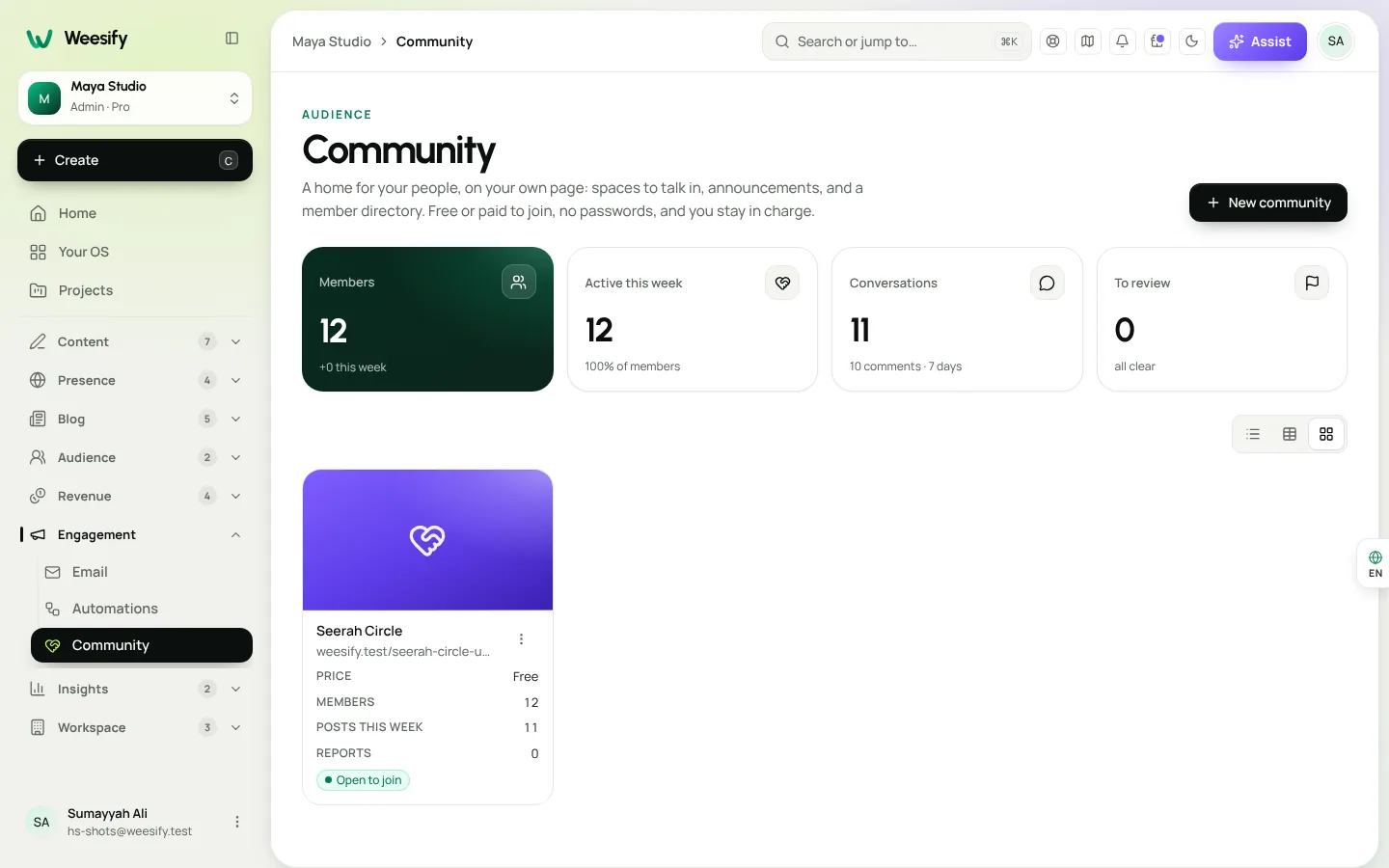
Open Engagement › Community and choose New community. Enter a Community name and choose Continue.
2. Add your spaces
In Spaces, add topics such as "Wins", "Questions" or "Introductions". Each can have a short description shown beside the feed and when posting. Use Move up and Move down to set the order.
3. Build the join page
In Join page & price, fill in:
- One line about it: the promise, in a sentence. "A daily space for adults learning to read the Quran with tajweed."
- Cover image: an abstract pattern or your brand artwork works well.
- Price to join: one payment, in your chosen Currency. Leave it empty for a community that costs nothing to join.
- Button text: "Join now" works; "Join the circle" may suit your voice better.
- Welcome message: shown at the top of the feed for new members.
- Guidelines: a few short rules, such as "Be kind. No selling in the feed. Credit other people's work."
4. Decide how open it is
Choose whether Members can start posts. When this is off, only the team and moderators start conversations and members comment, which suits announcement-led communities. Decide whether to show the Member directory. Members can see each other's names and bios; emails are never shown.
5. Choose how it looks
Pick a member experience: Social feed, Timeline, Professional, Gallery or Conversations. You can switch any time without losing anything. We compare them in community experiences: feeds, timelines and forums.
6. Open the doors
Choose Open community, then Copy join link. Share it anywhere, or add it to your bio page with a Product block so it sits alongside your other offers on your link-in-bio page.
Pricing: what to charge and how payment works
The Price to join is a single payment. To charge it, set up how you get paid in Store first; the community uses the same checkout as your products, so payment details are handled in one place.
There is no perfect price, but a few principles help:
- Price for the outcome, not the access. "Finish your first juz with a group" is easier to value than "access to a forum".
- Start lower for founding members, then raise the price for later cohorts. Early members bring the energy that makes it worth more.
- Be clear about what's included. List the spaces, how often you post, and any live sessions in the join page description.
You can also offer a discount to your existing audience. See discount codes and offers for ideas.
How members get in
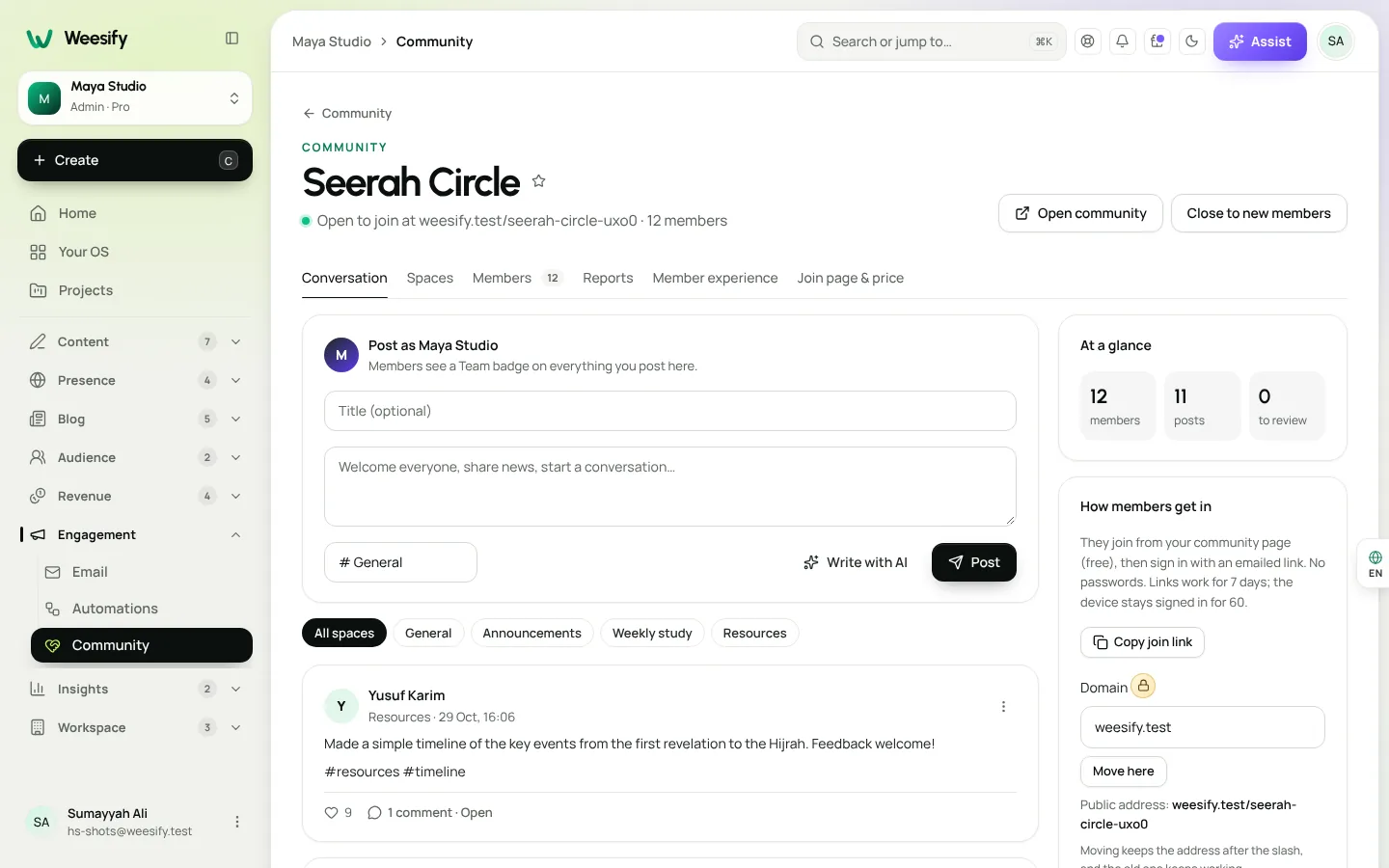
Members sign in with an emailed link, so there are no passwords to forget. Sign-in links work for 7 days, and a device stays signed in for 60. If someone can't get in, open Members, find them and choose Send sign-in link.
You can also bring people in yourself. In Members, use Add someone to invite people by email. This is useful for giving access to students who bought a related course, or to guests and collaborators.
Onboarding new members
The first visit decides whether someone becomes active or drifts away. Make it easy:
- Pin a welcome post in General with Pin to the top: who you are, what the spaces are for, and one easy first action.
- Ask for introductions with a specific prompt: "Tell us your name, where you're joining from and one goal for this month."
- Reply to every introduction in the first weeks. Members see a Team badge on your posts.
- Automate a welcome email. In Engagement › Automations, create an automation with the trigger Someone joins a community and send a short note with links to the best starting posts. See build a welcome sequence.
Moderation and safety
Healthy communities need light, consistent moderation.
- Make moderator: give trusted members the ability to help keep things tidy.
- Hide from members: take a post out of view without deleting it.
- Reports: members can report posts and comments. They appear under To review, where you can Keep them or Send to Weesify for review. When several members report the same post, it is hidden until your team looks at it.
- Remove: take a member out if they break the guidelines.
- Close to new members: stop new joins at any time. Current members keep their access.
Clear guidelines, visible from the join page, prevent most problems before they start.
Keeping it alive
A community lives on rhythm. A few habits that help:
- A weekly prompt on the same day, such as "Friday wins".
- A monthly live session, run as a video meeting or event, announced in the Announcements space.
- Highlighting member contributions in your newsletter.
Members get notified when someone replies to their posts, replies in a conversation they joined, mentions them, or when you post an announcement, and new posts appear live without refreshing. That keeps people coming back without you having to chase them.
FAQ
Do members need a password to join? No. Members sign in with an emailed link. Links work for 7 days, and a device stays signed in for 60.
Is the price a subscription or a one-time payment? The Price to join is one payment. Leave it empty if you want the community to cost nothing to join.
Can I see members' email addresses? You can, in Members. Other members only see names and bios in the member directory; emails are never shown to them.
What happens if I close the community to new members? New joins stop. Everyone already inside keeps their access.
Can I change how the community looks after launch? Yes. Switch the member experience any time. Posts, members, spaces and rules stay exactly the same.
Give your best people a home
A paid community turns your most engaged readers into a group that supports each other, and supports your work. Plan a few spaces, write a clear join page, set a fair price and show up consistently.
Start your 14-day trial and open your community this month.
Sigue leyendo
 Use cases
Weesify for Islamic Educators: Courses, Classes and Community
A practical look at how an Islamic educator can run courses, live classes, one-to-one sessions and a student community from one Weesify workspace.
Use cases
Weesify for Islamic Educators: Courses, Classes and Community
A practical look at how an Islamic educator can run courses, live classes, one-to-one sessions and a student community from one Weesify workspace.
 Use cases
Booking Page for Consultants: Fill Your Calendar Calmly
Stop the back-and-forth emails. A Weesify booking page lets clients pick a free time, pay up front and get a calendar invite and a private meeting room.
Use cases
Booking Page for Consultants: Fill Your Calendar Calmly
Stop the back-and-forth emails. A Weesify booking page lets clients pick a free time, pay up front and get a calendar invite and a private meeting room.
 Use cases
Weesify for Agencies: Host and Manage Client Websites
How an agency can host client websites, collect approvals, publish safely and hand projects over, with a separate Weesify workspace for each client.
Use cases
Weesify for Agencies: Host and Manage Client Websites
How an agency can host client websites, collect approvals, publish safely and hand projects over, with a separate Weesify workspace for each client.
Comentarios
Aún no hay comentarios. Empieza la conversación.