


Ramadan Campaign Planner: Grow Your Audience With Care

Ramadan is a month of focus, generosity and learning, and many people look for meaningful content and classes. Here is how to plan a Ramadan campaign in Weesify that serves your audience first and grows it as a result.
Every year, Ramadan changes how people spend their days. Routines move around suhoor and iftar. Evenings fill with prayer and family. Many people make time for learning they postponed all year: a tajweed class, a tafsir circle, a Seerah series, a habit they want to build before Eid.
For educators, masjids, charities and small businesses, that makes Ramadan a season to serve. Done thoughtfully, it is also when your audience grows most naturally, because you are offering exactly what people are looking for. This guide shows how to use Weesify as a Ramadan campaign planner: from the first idea, through the calendar, to the sign-ups, emails and community that keep people with you after Eid.
In this guide
- Start with intention, and plan early
- Capture ideas and give them shape
- Build the campaign on the planner
- Capture sign-ups with forms and QR codes
- Emails and automations that respect the month
- Community, classes and events
- Measure, then carry it past Eid
- FAQ
Start with intention, and plan early
A Ramadan campaign that feels like a sales push sits uneasily with the month. One that offers real benefit feels right. Before you plan anything, write one sentence: What will people gain from following us this Ramadan?
- "A daily five-minute reflection on one ayah."
- "A 30-day tajweed revision course for adults."
- "An iftar volunteer rota, so every night is covered."
- "Simple, healthy suhoor recipes for busy families."
Then plan early. The weeks before Ramadan are when people decide what they will follow during the month. Aim to have your campaign ready and your sign-up page live a few weeks before it begins. Exact dates depend on the moon sighting, so give yourself a margin on both ends.
Capture ideas and give them shape
Open Content › Ideas and choose Capture idea. Write each idea in a line, for example "Ramadan prep for busy parents" or "3 mistakes new Muslims make in their first Ramadan". Add Notes, a Pillar and Tags such as "ramadan, beginners".
Short on ideas? Choose Ideas with AI and type a topic. You get angles to choose from, written in the brand voice you set up, which you can refine or discard. Group the keepers in a collection called "Ramadan" so they are easy to find.
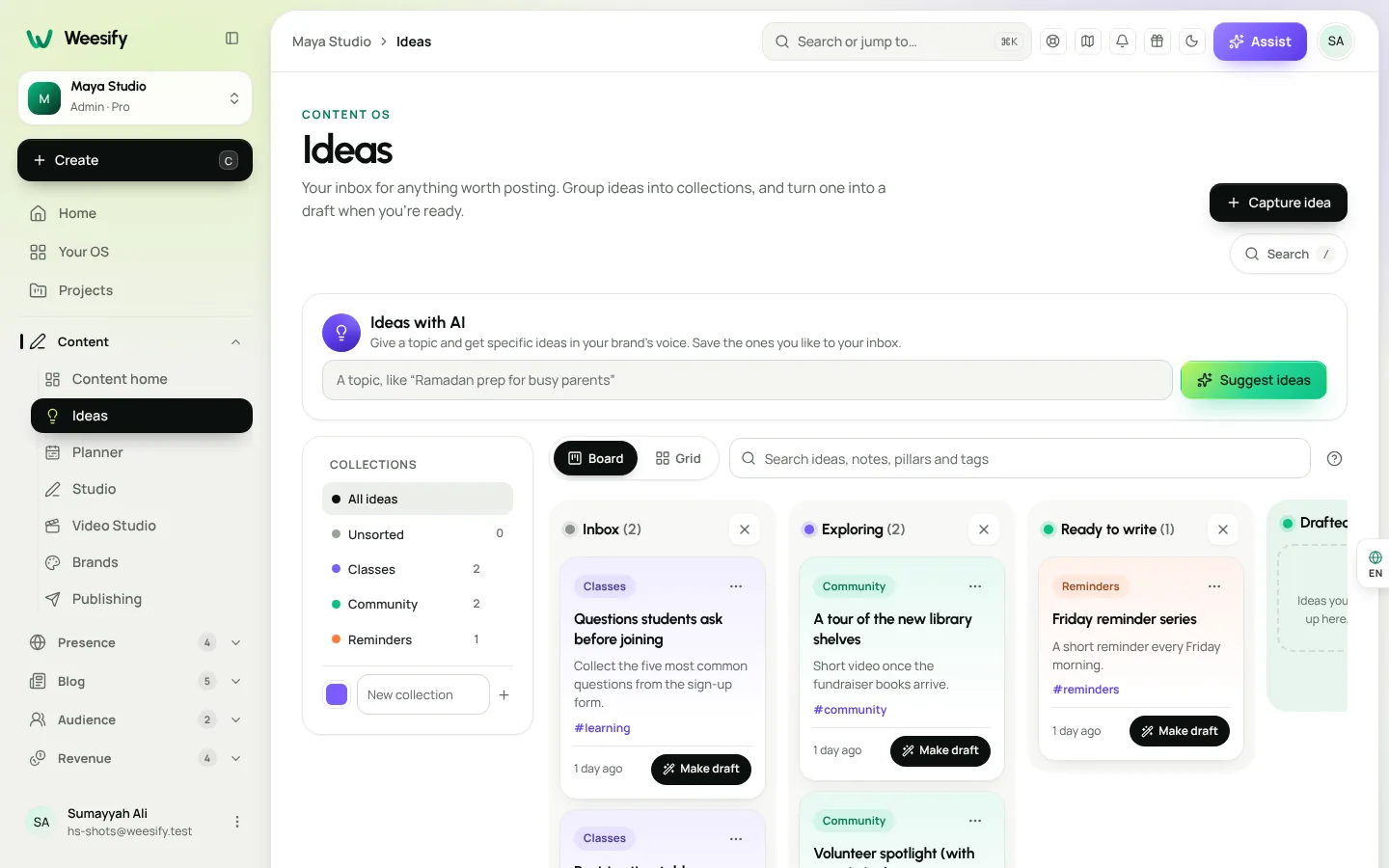
When an idea is ready, choose Make draft and it becomes a post in the Studio, with your notes attached. The AI content ideas guide covers this in more depth.
Build the campaign on the planner
A campaign groups posts around one goal, which makes it ideal for a month-long season.
- Open Content › Planner and choose New campaign.
- Enter a Name, such as "Ramadan revision course launch".
- Write a Brief: what the campaign is for, the key message and who it is for. The AI reads it when writing the campaign's posts, so be specific: "For adults who can read Arabic but want to fix their tajweed before Ramadan. Warm, encouraging, never guilt-driven."
- Set the Objective, then Starts and Ends dates. Start a few weeks before Ramadan and end after Eid.
- Under Promotes, choose An event, A course or A product if the campaign is about one, then pick which one.
- Choose a Colour and leave Show on calendar on, then choose Create campaign.
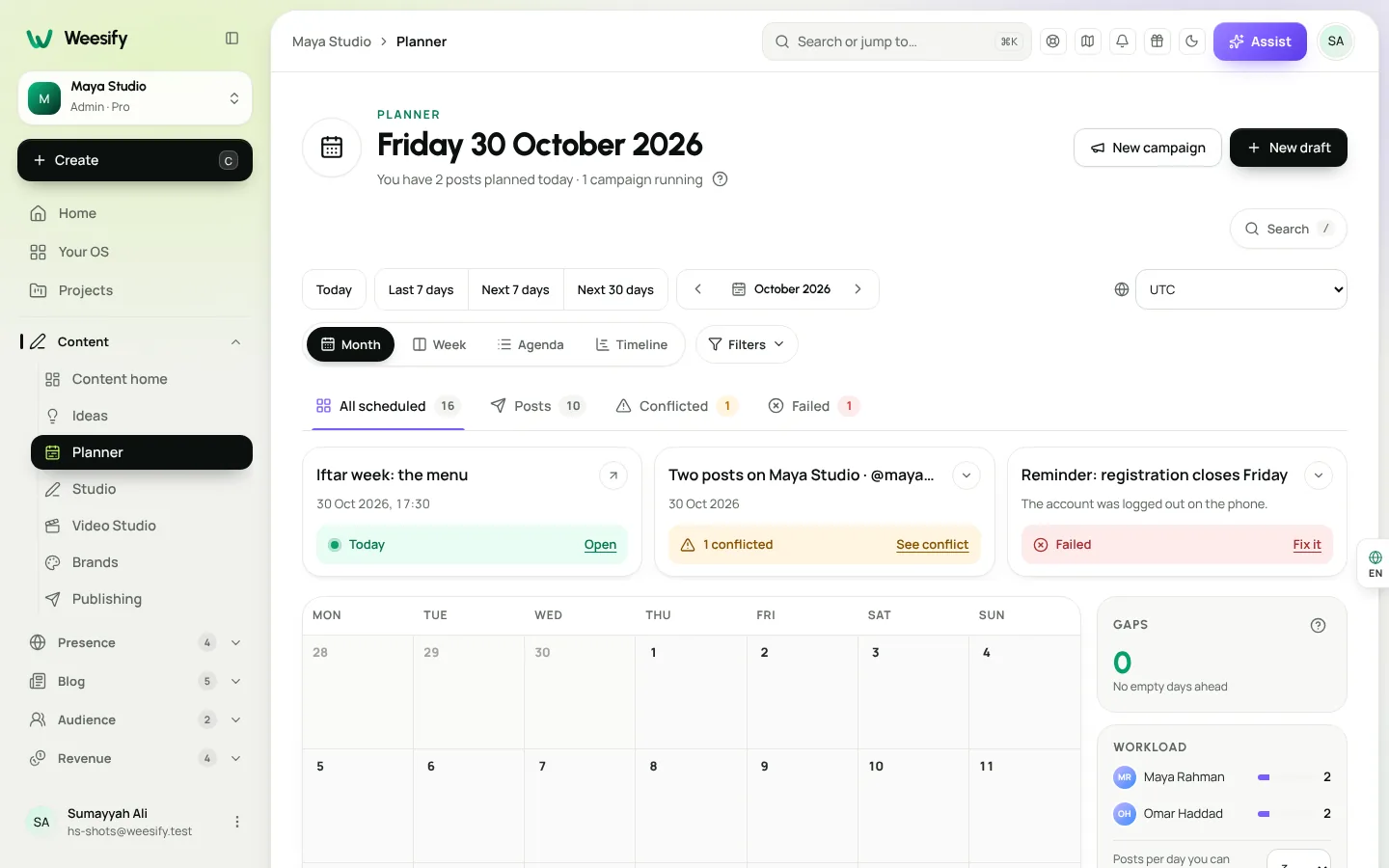
The campaign appears on the calendar as a bar you can follow day by day. Switch between Month, Week, Agenda and Timeline views to see it at different scales.
Plan for the month's rhythm
Ramadan has a shape, and your content can follow it:
| Phase | Focus | Example content |
|---|---|---|
| Weeks before | Preparation | "Set three Ramadan goals", class sign-ups open |
| First ten days | Building habits | Daily short reminders, beginner lessons |
| Middle ten days | Steady progress | Reflections, member wins, deeper lessons |
| Last ten nights | Worship and focus | Fewer, calmer posts; dua reminders |
| Eid and after | Gratitude and continuity | Thank-you, what's next after Ramadan |
Respect your own capacity
Ramadan is demanding for you too. Set Posts per day you can handle under Workload, and the planner warns you about busy days. Weesify also checks for Conflicts, such as posts too close together on one channel or scheduled posts without a channel, and shows Gaps, upcoming days with nothing planned. Posting steadily matters more than posting a lot. Use posting queues to schedule a batch ahead of time so you are not writing at suhoor.
Capture sign-ups with forms and QR codes
Growth happens when someone who enjoyed a post takes one more step. Give them one.
- A sign-up form for your Ramadan series, with an optional Email consent question and Tag everyone who answers set to "Ramadan 2027". See lead capture forms.
- A volunteer form for iftar or community events, with Date and Multiple choice questions for the nights people can help.
- A one-click QR code for each form, printed on masjid noticeboards, class handouts and shop counters. See form QR codes. In the QR studio, use a Campaign name such as "Ramadan" to group your printed codes.
If you offer one-to-one sessions, create a separate availability schedule called "Ramadan hours" in your bookings settings, so people can only book times that work around fasting and prayer. Read more in booking pages for consultants.
Emails and automations that respect the month
A Ramadan welcome
In Engagement › Automations, start an automation with A tag is added set to your "Ramadan 2027" tag. Send a warm welcome, a Wait, then a "where to start" email with the first lesson. The welcome sequence guide walks through it step by step.
A steady newsletter
Send a weekly broadcast to the people who joined, using A tag under Who gets it. Keep it short; people are busy. Use the Time zone option when you schedule, and check Best days and hours in Analytics to see when your audience is actually reading. During Ramadan, that may well be late evening or before Fajr.
The newsletter playbook covers subject lines, design and the content check.
Community, classes and events
Ramadan is collective, and your campaign can be too.
- A Ramadan community space. Add a space such as "Daily reflections" or "Khatm tracker" to your community, where members share progress. See build a paid community.
- A short course. A 30-day revision course with lessons dripped daily works well. See launch an online course.
- Live sessions. A weekly tafsir session as an event with tickets or registrations, or a weekly paid series.
Measure, then carry it past Eid
Check Insights › Analytics each week. Channels shows where visitors come from, Leads shows which channels bring sign-ups, and the Location tab shows where your audience is. If you used UTM tags such as utm_campaign=ramadan, compare the campaign against everything else. Our analytics guide explains each report.
The most important part of a Ramadan campaign comes after it. People who joined you in Ramadan chose to learn with you. Before Eid, plan what comes next: a Shawwal follow-up, a monthly class, or a continuing community space. Send a thank-you email after Eid and invite them to stay. That is how a seasonal campaign becomes a year-round audience. The content marketing funnel shows how to connect each step.
FAQ
When should I start planning a Ramadan campaign? Have your campaign and sign-up page ready a few weeks before Ramadan begins. People decide what they will follow during the month before it starts.
How many posts should I plan for Ramadan? Fewer than you think. Set a realistic daily limit under Workload, and focus on consistency. One thoughtful post a day is better than three rushed ones.
Can AI help write Ramadan content? Yes. Ideas with AI suggests angles in your brand voice, and the campaign Brief guides AI when drafting the campaign's posts. Always review and edit before publishing.
How do I keep people engaged after Eid? Plan a next step before Ramadan ends: a follow-up class, a community space or a monthly newsletter, and invite people with a thank-you email after Eid.
Can I track posters and printed QR codes separately? Yes. Use dynamic QR codes with a Campaign and Placement in the QR studio, and see scans in Analytics.
Serve first, and growth follows
A Ramadan campaign built on benefit earns attention that lasts beyond the month. Plan early, keep the rhythm gentle, make it easy to sign up, and have a next step ready for Eid.
Start your 14-day trial and plan your Ramadan campaign today.
Continuer la lecture
 Growth & marketing
AI Content Ideas That Sound Like Your Brand, Not a Robot
Generic AI ideas produce generic posts. Describe your brand voice once in Weesify and every idea, angle and draft starts closer to how you actually speak.
Growth & marketing
AI Content Ideas That Sound Like Your Brand, Not a Robot
Generic AI ideas produce generic posts. Describe your brand voice once in Weesify and every idea, angle and draft starts closer to how you actually speak.
 Growth & marketing
Captions, Highlights and Short Clips From One Long Video
One long talk can feed your short-video channels for weeks. Here is how to find the strongest moments, add captions people can read on mute, and export clips for every feed.
Growth & marketing
Captions, Highlights and Short Clips From One Long Video
One long talk can feed your short-video channels for weeks. Here is how to find the strongest moments, add captions people can read on mute, and export clips for every feed.
 Growth & marketing
Discount Codes and Offers That Sell Without Cheapening
Discounts can fill a launch or quietly train buyers to wait for a sale. Here's how to use Weesify discount codes, automatic sales, event codes and order bumps with intent.
Growth & marketing
Discount Codes and Offers That Sell Without Cheapening
Discounts can fill a launch or quietly train buyers to wait for a sale. Here's how to use Weesify discount codes, automatic sales, event codes and order bumps with intent.
Commentaires
Aucun commentaire pour l’instant. Lancez la conversation.