


Form QR Code in One Click: From Poster to Sign-Up

Every Weesify form can make its own QR code with one tap. It stays linked to the form, so the posters you print keep working, and you can style it to match your brand.
You are standing at a stall, a class or the back of a hall. Someone says, "How do I sign up?" You could spell out a web address letter by letter, or hand them a clipboard and decode the handwriting later. Or you could point at a square on the table and say, "Scan that."
A form QR code is the shortest path from a real-world moment to a contact in your audience. In Weesify, every form can make one with a single tap, and the code stays tied to that form for good. This post shows how it works, how to style it, and where it earns its place.
In this guide
- What the one-click form QR code does
- Making one from the forms list or the builder
- Styling it in the QR studio
- Printing tips so it scans every time
- Where form QR codes work best
- FAQ
What the one-click form QR code does
Most QR tools ask you to copy a link, open another app, paste it, design a code, download it, and then hope you never change the link. Weesify cuts that down to one button.
When you choose Create QR code on a form, Weesify makes a QR code that opens that form's public address. Behind the scenes it is a real code in your QR codes library, so it follows the same plan limits and design tools as any other code you make. A few details make it dependable:
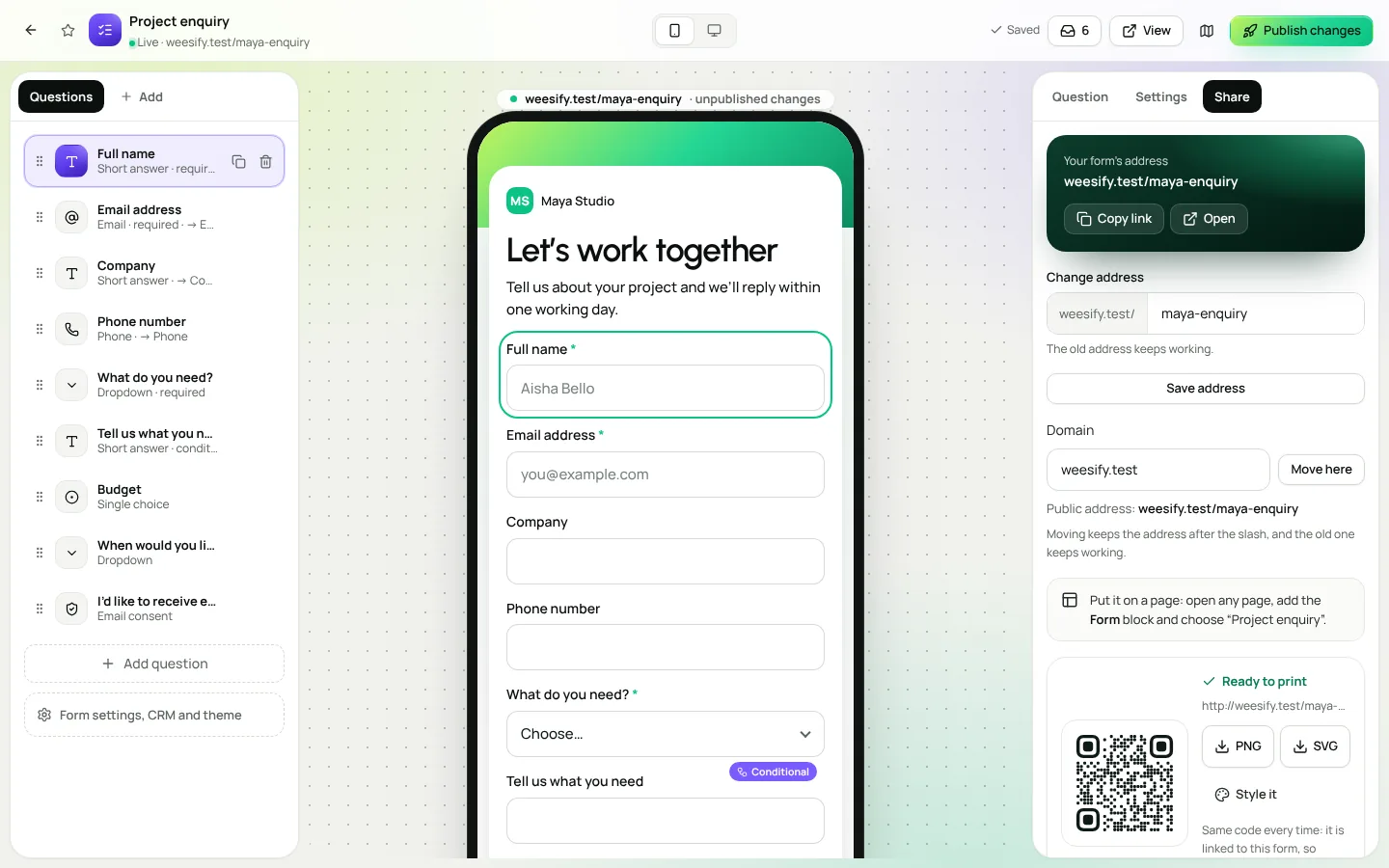
- One code per form. Press the button again and you get the same code, not a duplicate. The screen says it plainly: Same code every time: it is linked to this form, so posters you print keep working.
- It follows the form. If you change the form's address, the code is pointed at the new one and keeps its design. The old form address also keeps working.
- It is ready to print. You can download it straight away as PNG or SVG.
The code opens the form once it is published, so you can make the QR code early, send the poster to the printer, and publish the form when you are ready.
Make a form QR code
There are three places to find the button, so it is always one tap away.
Right after you create a form
When you create a new form, the Your form is ready screen shows its reserved address and offers Create QR code next to Start adding questions. Handy when you already know the form is for a poster.
From the forms list
- Open Audience › Forms.
- Open the actions menu on any form and choose QR code.
- In the window, choose Create QR code.
- Choose PNG or SVG to download it, or Style it to design it.
From the builder
Inside the form builder, open Share. The QR code for this form panel sits beside the form's link, with the same Create QR code button. Once the code exists, you see a preview marked Ready to print, the address it opens, and the download buttons.
Who can make one? Anyone on your team with permission to create QR codes. Others still see the code once it exists.
Style it in the QR studio
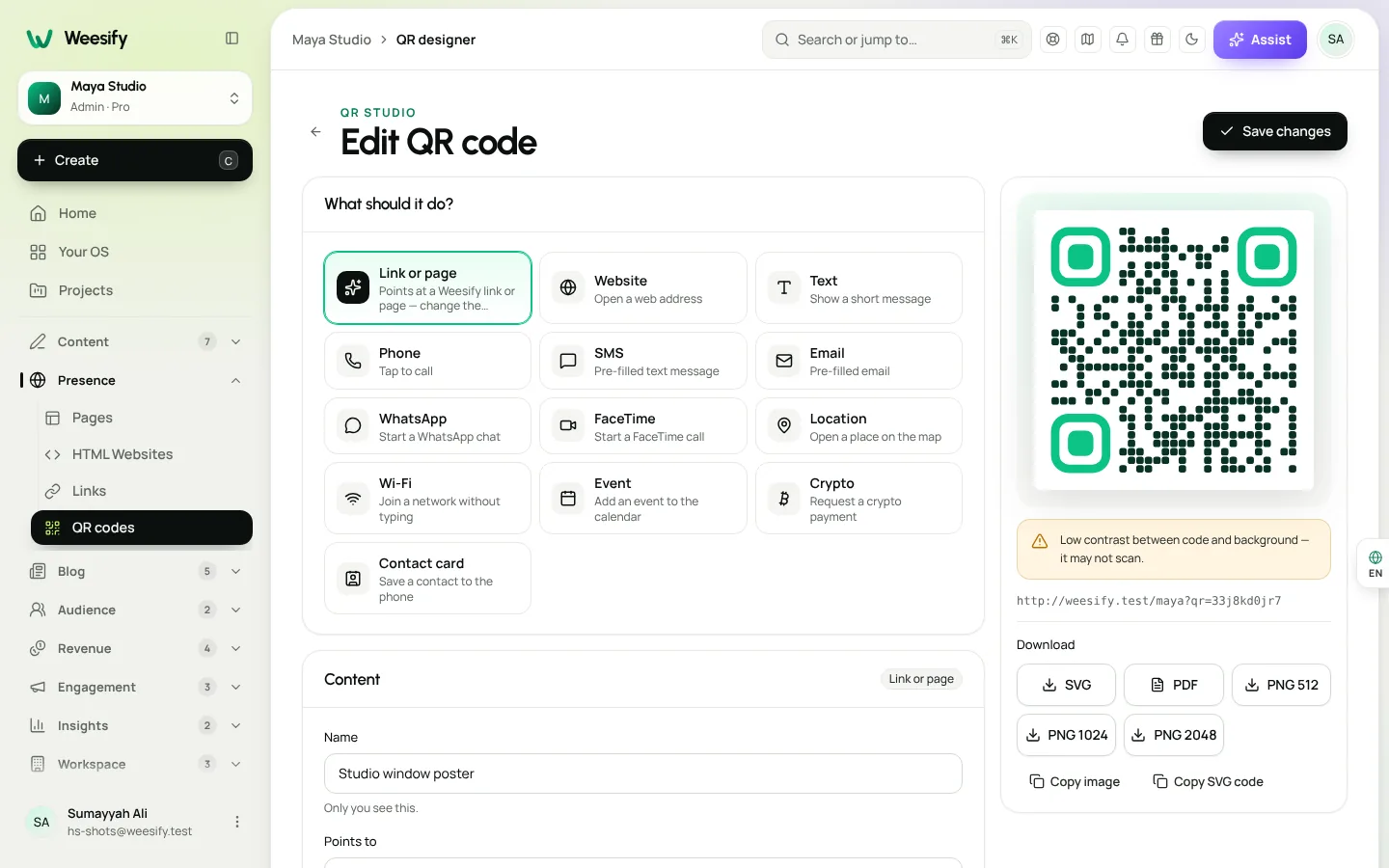
The quick code is clean black on white and scans reliably. When you want it to look like yours, choose Style it. That opens the code in the QR studio, where you can change:
- Colours: code colour, background, and separate colours for the Corner squares and Corner dots. Gradients are available too.
- Shapes: the style of the dots and corners.
- Frames and call-to-action labels: a frame around the code with words such as "Scan me", or your own.
- Logo: place your logo in the middle, where your plan includes it. Error correction is raised to High automatically, and the logo is kept small enough to scan.
- Campaign, placement and project: group codes to compare them, for example a Campaign called "Ramadan open day" and a Placement of "Masjid noticeboard".
The studio also offers Dynamic: track scans and edit later, depending on your plan. A dynamic code opens a short link that forwards to the form, so every scan is counted in your analytics and you can change where it goes after printing. Downloads from the studio include a print-ready PDF and a 2048 px PNG.
The studio warns you about things that stop a code scanning, such as low contrast, light-on-dark codes that not every scanner reads, and logos that are too large. Take the hints seriously; they exist because printed codes are expensive to redo.
Printing tips so it scans every time
| Do | Avoid |
|---|---|
| Leave a quiet border of at least 2 modules around the code | Placing the code right against an image edge |
| Use strong contrast, dark code on a light background | Pale colours, or light code on a dark background |
| Add a short line beside it: "Scan to register" | A bare code with no reason to scan |
| Test it with two different phones before printing | Assuming the preview equals the printed result |
| Print it large enough for the distance people stand at | Postage-stamp codes on a wall poster |
| Use the SVG or PDF for professional printing | Stretching a small PNG |
A good rule of thumb: if people will scan from across a table, a few centimetres is plenty. On a wall or banner, go much bigger.
Where form QR codes work best
A form QR code shines anywhere people are physically present and interested, but not ready to type a web address.
- Classes and study circles. A code on the last slide: "Scan to get next week's notes." Combine it with an Email consent question so people can join your list. See lead capture forms that turn visitors into contacts.
- Events and open days. A volunteer sign-up, a feedback form, or "Tell us what to cover next." For event tickets and check-in, see QR codes for events and print.
- Shop counters and market stalls. "Get 10% off your next order" leading to a short form, followed by an automated email with the code. Discounts are covered in discount codes and offers.
- Masjid and community noticeboards. A Ramadan iftar volunteer rota, a class waiting list or a fundraising interest form. We cover seasonal planning in growing your audience with a Ramadan campaign.
- Packaging and printed products. A code inside the box that opens a feedback form or a "register your purchase" form.
Each answer lands in Contacts with the tag you chose in Tag everyone who answers, so a noticeboard sign-up and an Instagram sign-up are easy to tell apart. If you want a finer split, give each printed placement its own tag on a duplicate of the form, or use a dynamic code with a Placement so scans are counted by poster.
See what the codes bring in
Open Insights › Analytics. QR scans sits among the top numbers, counted from dynamic codes. For the people who actually leave their details, the From view to lead funnel follows visitors from a view to a click to leaving their details, and Leads by source and place shows where sign-ups come from. Our guide to knowing where your visitors come from explains each report.
If you want to understand QR codes more broadly, including the difference between static and dynamic codes, read dynamic QR codes explained.
FAQ
Will my printed QR code break if I change the form? No. The code is linked to the form. If you change the form's address, the same code is pointed at the new one, and the old address keeps working too.
Can I make more than one QR code for the same form? The one-click button always returns the same code, so you never end up with duplicates. If you want separate codes for different posters, create extra codes in QR codes pointing at the form's address, each with its own placement.
Does the QR code work before the form is published? You can create and print it any time. It opens the form once the form is published.
Can I add my logo? Yes, in the QR studio, where your plan includes logos. Weesify raises error correction to High and keeps the logo small enough to scan.
Which file should I give my printer? SVG or the print-ready PDF from the QR studio. Both stay sharp at any size.
From paper to people
The best sign-up form is the one people can reach in two seconds. Build the form, tap Create QR code, and put it where your audience already stands.
Start your 14-day trial and print your first form QR code this week.
Teruskan membaca
 Features
Dynamic QR Codes Explained: Print Once, Update Forever
A dynamic QR code points at a link you control, so you can change where it goes and count every scan without reprinting. Here is how they work in Weesify.
Features
Dynamic QR Codes Explained: Print Once, Update Forever
A dynamic QR code points at a link you control, so you can change where it goes and count every scan without reprinting. Here is how they work in Weesify.
 Features
How to Make Quiet Audio Louder in a Video (Without Distortion)
A quiet recording can sink a good video. Weesify Video Studio measures your footage, warns you when it is too quiet, and makes it louder to the level social platforms expect, with a limiter so it never distorts.
Features
How to Make Quiet Audio Louder in a Video (Without Distortion)
A quiet recording can sink a good video. Weesify Video Studio measures your footage, warns you when it is too quiet, and makes it louder to the level social platforms expect, with a limiter so it never distorts.
 Features
Self-Hosted Video Meetings: Meet Clients Inside Weesify
Weesify Meetings gives every online booking its own private video room, hosted on Weesify's own servers. No outside meeting links, no app for your guests.
Features
Self-Hosted Video Meetings: Meet Clients Inside Weesify
Weesify Meetings gives every online booking its own private video room, hosted on Weesify's own servers. No outside meeting links, no app for your guests.
Komen
Belum ada komen. Mulakan perbualan.