


Community Experiences: Feed, Timeline, Forum or Gallery?

Weesify Community offers five member experiences, from a social feed to threaded conversations. Here is what each one feels like, who it suits, and how to switch without losing a thing.
Two communities can have the same members, the same topics and the same rules, and still feel completely different. One feels like a lively feed you scroll with a cup of tea. Another feels like a quiet library where every question gets a careful, threaded answer. The difference is the experience: how posts are laid out, how replies nest and what the page puts first.
Weesify Community lets you choose that experience. There are five community experiences, and you can switch between them at any time. Posts, members, spaces and rules stay exactly the same; only the way it looks and feels for members changes. This post explains each one and helps you pick.
In this guide
- What every experience includes
- The five experiences, one by one
- A comparison table
- How to choose and switch
- Making any experience feel lively
- FAQ
What every experience includes
Whichever one you pick, members get the same foundations:
- Rich text in posts and comments, with links and formatting.
- Photos and videos, up to four on a post.
- Reactions shown with real icons, and comments under every post.
- Mentions, so members can bring someone into a conversation with @.
- Profiles with a headline, location and links, an initials avatar in a colour of their choice and an abstract cover pattern or an image they upload. Badges come only from real data, such as role or when they joined.
- Notifications for replies to their posts, replies in conversations they joined, mentions and new announcements.
- Live updates, so new posts and comments appear without refreshing.
- Light and dark themes.
Your team's posts carry a Team badge in every experience, and spaces, pinned posts, guidelines and the member directory all work the same way.
The five experiences
Social feed
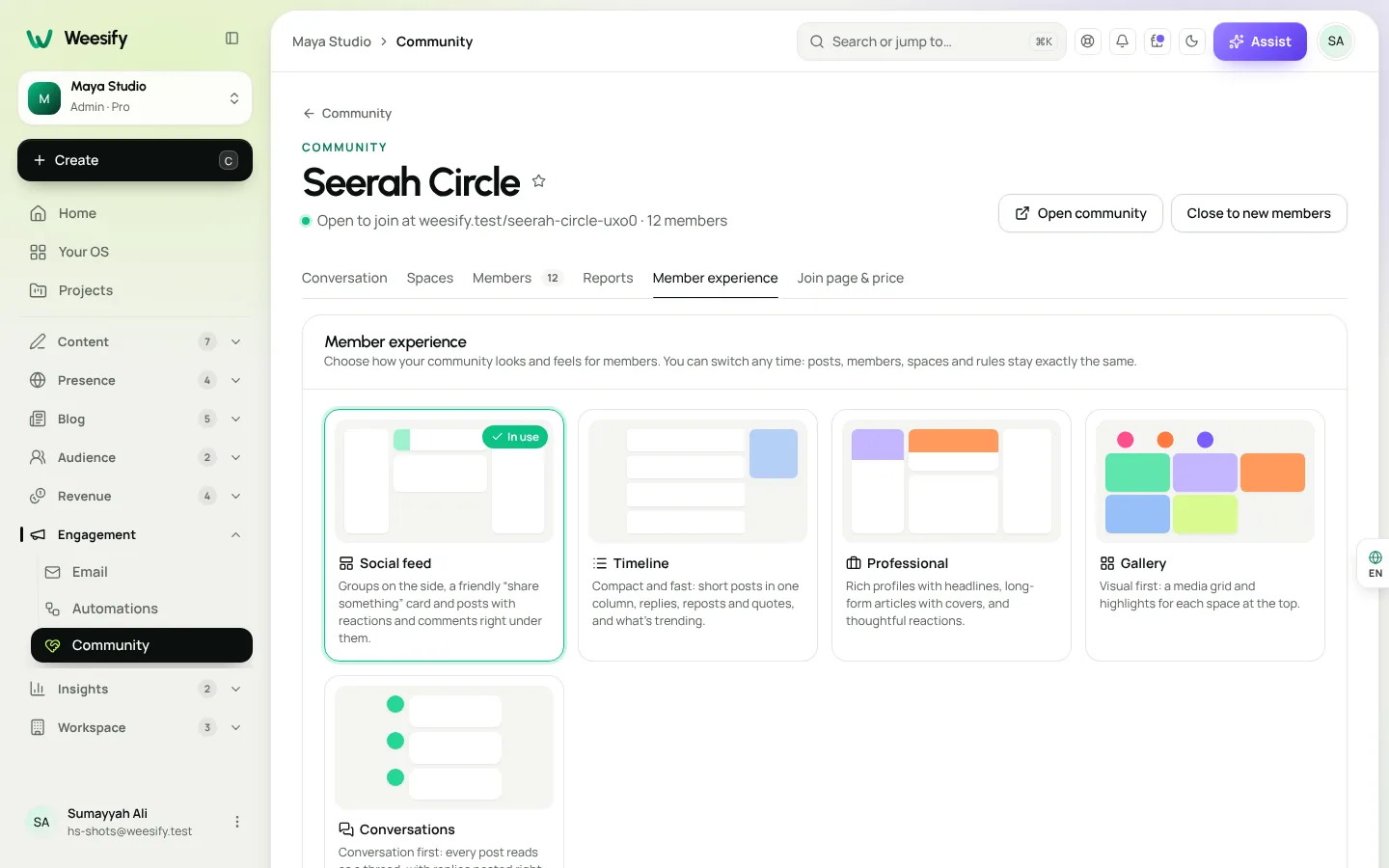
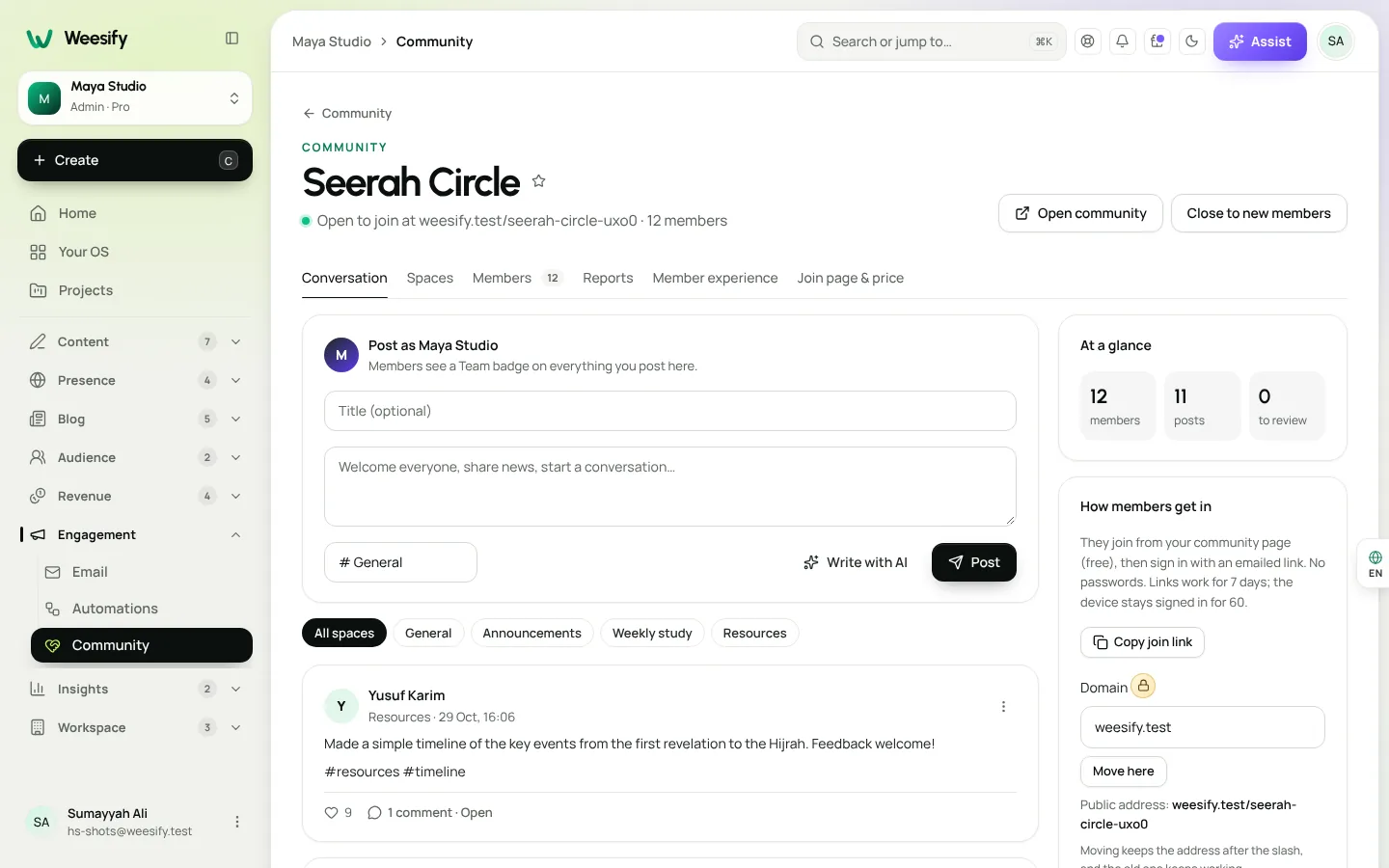
Groups on the side, a friendly "share something" card at the top, and posts with reactions and comments right under them. The composer greets each member by name and asks what's on their mind.
Best for: general creator communities, alumni groups and anyone whose members already know how a social feed works. It is the most familiar, which makes it the easiest place to start.
Timeline
Compact and fast: short posts in one column, with replies, reposts and quotes, and a view of what's trending. The composer simply asks "What's happening?"
Best for: quick daily updates, accountability groups ("Today I revised two pages") and communities where members post often and briefly.
Professional
Rich profiles with headlines, long-form articles with covers, and thoughtful reactions. The composer invites members to share an idea, an update or a lesson learned.
Best for: professional networks, mastermind groups, consultants and teachers who want members to write considered posts rather than quick reactions. If your members are freelancers, founders or educators sharing what they learned, this one fits.
Gallery
Visual first: a media grid, with highlights for each space at the top. The composer asks members to share a photo or a moment.
Best for: design, calligraphy, cooking, crafts, architecture and other visual work where the image is the post. Members browse work at a glance and open what catches their eye.
Conversations
Conversation first: every post reads as a thread, with replies nested right underneath. The composer starts a thread.
Best for: question-and-answer communities, study circles and support groups, anywhere a forum would traditionally be used. When someone asks "How do I apply the rule of idgham here?", the answers and follow-ups stay together and easy to follow.
Side-by-side comparison
| Experience | Layout | Feels like | Great for |
|---|---|---|---|
| Social feed | Feed with groups at the side | A familiar social network | Broad creator communities |
| Timeline | One compact column | A fast microblog | Frequent, short updates |
| Professional | Profiles and long-form articles | A professional network | Masterminds, experts, educators |
| Gallery | Media grid with space highlights | A portfolio wall | Visual and creative work |
| Conversations | Nested threads | A modern forum | Q&A, study circles, support |
How to choose
Start from how your members will actually use the community, not how you want it to look:
- What do members mostly post? Images point to Gallery. Questions point to Conversations. Long reflections point to Professional. Quick check-ins point to Timeline.
- How often do they post? Several times a day suits Timeline or Social feed. A few careful posts a week suits Conversations or Professional.
- What do they already use? A familiar shape lowers the barrier to the first post.
- What does your content look like? A calligraphy teacher and an Arabic grammar teacher may have similar audiences but very different posts.
If you are unsure, start with Social feed. It works for most communities, and switching later is safe.
How to switch
- Open Engagement › Community and choose your community.
- Open the Member experience tab.
- Choose Social feed, Timeline, Professional, Gallery or Conversations.
- Choose Open the community to see it as a member would. The one in use is marked In use.
Nothing is lost when you switch. A post written in Timeline appears as a thread in Conversations and as a card in Social feed. Spaces, members, moderators, reports and guidelines carry over exactly.
A good approach is to try two experiences for a week each and ask members which they prefer. You can post the question in your Announcements space and let the replies decide.
Making any experience feel lively
The experience sets the stage, but people make the community. A few habits help in every layout:
- Seed the first posts. Before you share the join link, write three or four posts that show what good participation looks like.
- Use space descriptions. A short line such as "Share one win from your week, however small" tells people exactly what belongs there.
- Pin a welcome post with Pin to the top, so new members know where to begin.
- Reply quickly at first. Early replies set the tone. Members see your Team badge and know they're being heard.
- Bring the community into your other channels. Mention great member posts in your newsletter, and plan community prompts alongside your other content in the content calendar.
If you are still deciding whether to charge for access, read how to build a paid community. If you want to see which posts and channels bring new members in, analytics can help.
FAQ
Will I lose posts if I change the community experience? No. Posts, members, spaces and rules stay exactly the same. Only the layout and feel change for members.
Can different spaces use different experiences? The experience applies to the whole community, so members get a consistent feel. Use space descriptions and team-only spaces to give each space its own purpose.
Which experience works best as a forum? Conversations. Every post reads as a thread with replies nested underneath, which keeps questions and answers together.
Do members see real-time updates? Yes. New posts and comments appear live, and members are notified about replies, mentions and new announcements.
Does the community work in dark mode? Yes. Every experience works in light and dark.
Pick the shape that fits your people
The best community experience is the one your members use without thinking about it. Choose one, open the community, watch how people post, and switch if a different shape fits better. Nothing is lost along the way.
Start your 14-day trial and open your community with the experience that suits your members.
Teruskan membaca
 Features
Dynamic QR Codes Explained: Print Once, Update Forever
A dynamic QR code points at a link you control, so you can change where it goes and count every scan without reprinting. Here is how they work in Weesify.
Features
Dynamic QR Codes Explained: Print Once, Update Forever
A dynamic QR code points at a link you control, so you can change where it goes and count every scan without reprinting. Here is how they work in Weesify.
 Features
How to Make Quiet Audio Louder in a Video (Without Distortion)
A quiet recording can sink a good video. Weesify Video Studio measures your footage, warns you when it is too quiet, and makes it louder to the level social platforms expect, with a limiter so it never distorts.
Features
How to Make Quiet Audio Louder in a Video (Without Distortion)
A quiet recording can sink a good video. Weesify Video Studio measures your footage, warns you when it is too quiet, and makes it louder to the level social platforms expect, with a limiter so it never distorts.
 Features
Self-Hosted Video Meetings: Meet Clients Inside Weesify
Weesify Meetings gives every online booking its own private video room, hosted on Weesify's own servers. No outside meeting links, no app for your guests.
Features
Self-Hosted Video Meetings: Meet Clients Inside Weesify
Weesify Meetings gives every online booking its own private video room, hosted on Weesify's own servers. No outside meeting links, no app for your guests.
Komen
Belum ada komen. Mulakan perbualan.